
The Cost & Profit report only works from what you enter on your items. If Cost of Item and Date Purchased are blank, the report still opens but its costs and profits are wrong or empty. Also check that the report is set to the right store and date range.
Who this is for: Vendor
These steps use the New Experience. If your menu looks different, click Switch to New Vendor Experience at the top of the page.
Open the report
- Click Reports in the menu.
- Under How are my sales?, click Cost / profit. This opens the classic Cost & Profit report.
- Check the Store Selector (top right) and Date Range (top left). The cards and charts only count the store and dates you pick.
For how to filter, sort, choose columns and export, see "How do I use my vendor reports?".
Fill in cost and purchase date
- Click Inventory in the menu.
- On the item's row, open the ... menu and choose Edit item.
- Click Edit Item if the form opens in view mode.
- Under Basics, enter Cost of Item. Under Item Details, enter Date Purchased.
- Click Save Item.
What's on the report
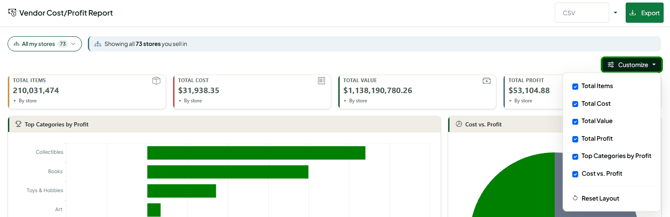
Cards and charts: Total Number of Items, Total Cost, Total Value, Total Profit, Top Categories by Profit and Cost & Profit Ratio.
Grid columns (add or remove them with the Columns button above the grid):
- Store (if you're a vendor at several stores)
- Item ID (Syncrostore's own ID for the item)
- SKU/UPC, Description, Quantity (on hand now), Price (what you charge now)
- Date Purchased, and Age (days since you bought it)
- Total Cost (what the item cost you)
- Total Sale Price (the price when the item was added)
- Total Profit (Total Sale Price - Total Cost)
- Date Added, and Age (days since it was added)
- Vendor ID, Category, Condition, Brand, Notes, Tags
- Offer Shipping, Publish Local/Online (TrinketVault), Weight, Date Modified
Troubleshooting
- Profit equals the full price: the item has no Cost of Item. Add it in Edit item.
- Age is blank or wrong: add Date Purchased in Edit item.
- Numbers look off or the report is empty: check the Store Selector and Date Range, then clear any blue (filtered) column.
