
You can sell new gift cards, choose how long they last, and add money to cards customers already have, all from the register. This article walks through each step and explains what the messages on screen mean.
What you can do
- Sell a new gift card for any amount, with an expiration date you choose (at least 5 years out).
- Reload a gift card the customer already has, adding money on top of what is left on it.
- Return a gift card sale or reload, which takes the money back off the card.
Gift card lines are never taxed, and discounts do not apply to them.
Don't see the Sell Gift Cards button?
Gift cards may not be part of your store's plan. Contact Syncrostore support and we'll help.
Sell a new gift card
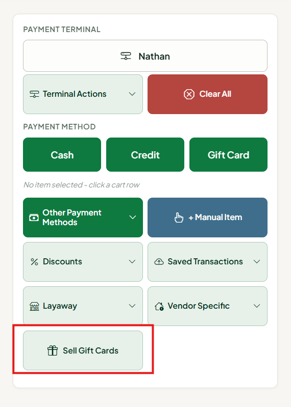
- On the register, click Sell Gift Cards. The Sell or reload gift card window opens.
- Scan the card's barcode, or type the card number and press Enter. A green message under the fields tells you what kind of card it is (see the table below).
- Enter the Amount to put on the card.
- Check the Expires date. It starts at 5 years from today. Change it if your store wants the card to last longer. See Choosing the expiration date below.
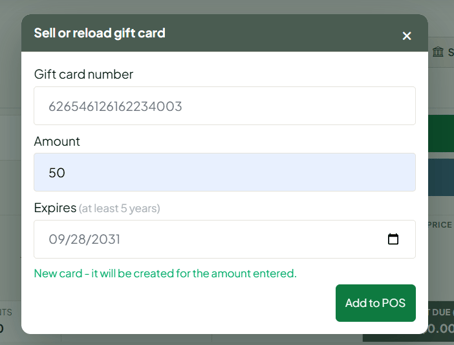
- Click the green Add to POS button, or press Enter in the Amount box. The card is added to the cart with a GIFT CARD tag.
- Take payment as usual. The card is not activated until the sale is paid in full.
What the message after scanning means
| Message | What it means |
|---|---|
| New card - it will be created for the amount entered. | This number has never been used. The card is set up automatically for the amount you enter. This is the most common case. |
| Existing card - $25.00 preset. | The card was set up ahead of time on the Gift Cards page with a set amount. The amount is locked and cannot be changed at the register. |
| Existing card with no balance - it will be loaded with the amount entered. | The card was set up with no amount. Enter the amount to put on it. |
| Created here, not yet sold - $50.00. Change the amount if it is wrong. | The card was started at a register but never paid for. You can correct the amount. |
| Active card - balance $12.50. Enter the amount to add. | The card is already in use. This is a reload. See Reload a gift card below. |
Choosing the expiration date
- The Expires date starts at 5 years from today, the federal minimum for gift card funds.
- You can pick any later date. Earlier dates are greyed out and cannot be chosen.
- If a preset card already has a date that meets the minimum, the window starts with that date.
- If a sale is saved and finished on a later day, Syncrostore automatically makes sure the card still lasts at least 5 years from the day the sale is completed.
- Reloads do not ask for a date. See the next section.
Reload a gift card
- Click Sell Gift Cards.
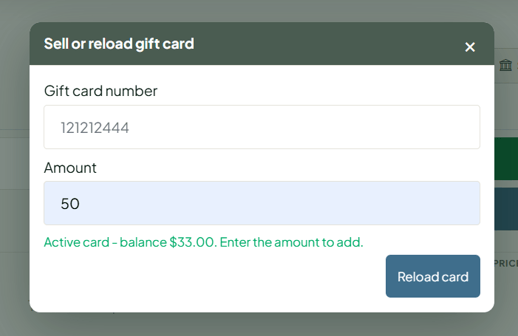
- Scan or type the customer's card number and press Enter. You will see Active card - balance $X.XX. Enter the amount to add.
- Enter the Amount to add. This is added on top of what is already on the card.
- Click the blue Reload card button. The button turns blue so it's clear this is a reload and not a new sale.
- The line is added to the cart with a GIFT CARD RELOAD tag. Take payment as usual.
- The money is added to the card when the sale is paid in full.
Good to know about reloads
- Each reload extends the card's expiration to at least 5 years from the day of the reload.
- Reloading an expired card brings it back into use, including any money that was left on it.
- A card can only be reloaded at the store that issued it.
Changing the amount after a card is in the cart
A gift card line is always one card for one amount. The quantity and price of a gift card line cannot be edited, and the Price button does not appear on it. This keeps the amount the customer pays and the amount on the card the same.
To change the amount: click Delete on the gift card line, then click Sell Gift Cards and scan the card again. Nothing is put on a card until the sale is paid, so deleting the line is always safe.
Returning a gift card sale or reload
When a gift card sale or reload is returned, the refunded amount comes back off the card. That way the customer does not keep both the refund and the balance.
- Open the original transaction and choose Cash Return or Credit Return, as you normally would.
- Add the gift card line to the return cart and process the return.
- Syncrostore checks that the card still has enough money on it before any refund is made.
- If the card still has the money, the return goes through and the card's balance goes down by the returned amount.
- If the customer has already spent some of it, you will see a message like Gift card [number] has $5.00 available, but this return takes back $25.00. Remove it from the return. No refund is made. Remove the gift card line from the return. Other items on the same receipt can still be returned.
Voiding a sale that includes a gift card
The Void button is greyed out on any transaction that sold or reloaded a gift card, and on a return that took money off a gift card. Hover over the button to see why. A void refunds the payment but cannot undo what happened on the card.
Use Return instead. A return takes the money back off the card. On card sales, keep in mind that a return shows as a refund on the customer's statement, where a same-day void would not.
Messages you might see
| Message | What to do |
|---|---|
| That gift card number belongs to another store. | The card was issued at a different store and can't be sold or reloaded here. Use a different card. |
| That gift card is already on an open or saved sale. | The card is in another register's cart or on a saved sale. Finish or clear that sale first. |
| That number is too long for a new card (max 20 characters). | New card numbers can be up to 20 characters. Check the number or use a different card. |
| Choose an expiration date at least 5 years from today | The Expires date is empty or too early. Pick a date 5 or more years out. |
| That line's quantity can't be changed. / That line's price can't be changed. | Gift card lines are fixed. Delete the line and scan the card again with the right amount. |
| Gift card [number] is set up for $X but its line charges $Y. | Shown when you take payment. The card's amount and the cart line don't match. Delete the line and scan the card again. |
| Gift card [number] is already active, so it cannot be sold again. | The card was activated after it was added to the cart. Delete the line and scan it again. It will offer a reload instead. |
| Gift card [number] is not active, so it cannot be reloaded. | The card was turned off after it was added. Delete the line and scan it again, or check the card on the Gift Cards page. |
| The return was recorded, but the gift card balance could not be reduced. | The refund went through and the amount is held on the card so it can't be spent. Contact Syncrostore support with the return's transaction number and we'll finish it. |
Frequently asked questions
Does the customer pay a card processing fee on a gift card?
If your store adds a card processing fee, it applies to gift card sales and reloads the same as other items. The card is always loaded with the amount you entered, not the amount including the fee.
Can a customer buy two gift cards at once?
Yes. Scan each card separately. Each card is its own line in the cart.
Can I sell a preset card for a different amount?
Not from the register. A manager can change the preset amount on the Gift Cards page before the card is sold.
Can a gift card from one of our other locations be reloaded here?
No. A card can only be reloaded at the store that issued it. If your stores share gift cards, customers can still use cards from a connected store to pay.
What happens to a card if the sale is cleared or never paid?
Nothing is added to the card. A new card stays inactive and can be sold later. A reload simply doesn't happen.
Can I save a sale with a gift card in it and finish it later?
Yes. Gift card lines save and restore like any other item. The expiration date is still guaranteed to be at least 5 years from the day the sale is completed.
Need help?If you see a message that isn't covered here, or something doesn't look right on a card, contact Syncrostore support. Include the card number and the transaction number, and we'll take a look.
