
Go to Sales > Gift Cards, search for the card number, and press View to see its balance and history or edit its expiration, vendor or customer.
Who this is for: Store admin, Cashier
These steps use the New Experience. If your menu looks different, click Switch to New Experience at the top of the page.
Find a gift card
- Go to Sales > Gift Cards.
- Pick a chip: Active, Not activated, Used up, Expired or All.
- Type in the search box ("Card number, customer or vendor").
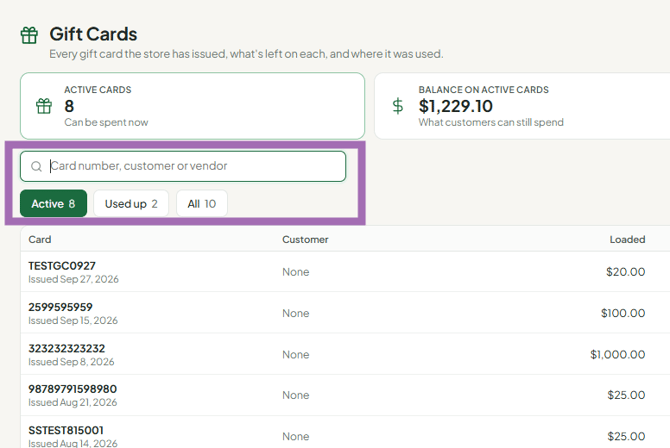
The list shows Card, Customer, Loaded, Balance, Last used, Expires and Status.
View a card's details
Press View on the card's row. The drawer shows:
- The card's current balance.
- Card details - Card number, Expires, Loaded amount, Customer, Vendor.
- Balance history - sale, activation, reloads and expiry.
- Sales it was used on - so you can see exactly how the funds were spent.
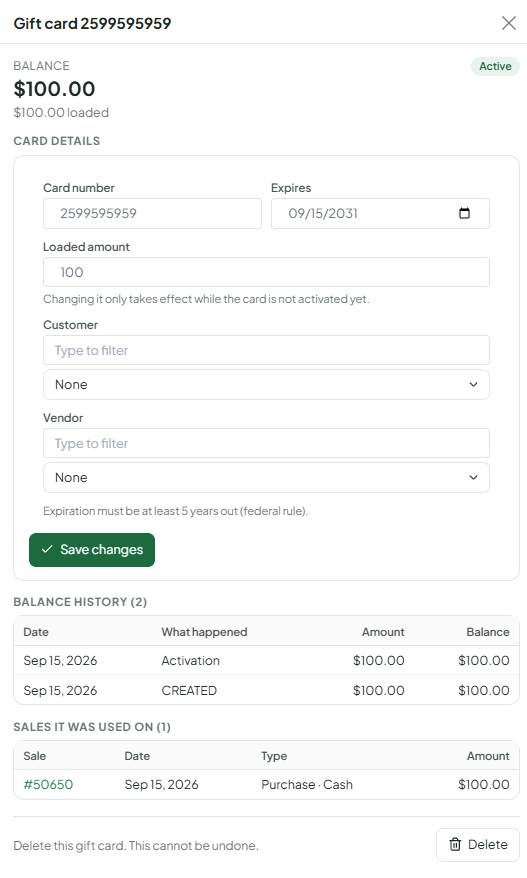
A card is active only after it has been sold and paid for at the register. Administrators also see Activate now on a card that isn't active yet.
Edit a card
- Press View on the card.
- Under Card details, change Expires, Vendor or Customer. Expiration must be at least 5 years out. For a preset card that hasn't been sold yet, a manager can change the amount.
- Press Save changes.
The balance of an active card can't be edited here: if you change Loaded amount on an active card, the other details save but you see "This gift card is active, so its balance was left unchanged". An active card's balance only moves through sales and redemptions.
Add money to a card (reload)
Reloads are done on Sales > Register: press Sell Gift Cards, scan the existing card, enter the amount to add, and press Reload card. See How do I sell or add money to a gift card?.
Delete a card
Press View on the card, then Delete, and confirm. There is no balance check: an active card with money on it can be deleted, and the customer loses that balance. Delete only cards that were never sold or are used up. A card issued at another store can only be deleted from that store.
Troubleshooting
- Card shows a "reserved" amount: part of the balance is applied to an open or saved sale. Finish or clear that sale to release it.
- Card won't work at checkout: check its Status is active (it was sold and paid for) and it hasn't expired.
