
The Inventory report's Total Cost is built from the Cost of Item you enter on each item, so items with no cost add $0. The Inventory page cards count your stock their own way, so the two can show different totals.
Who this is for: Vendor
These steps use the New Experience. If your menu looks different, click Switch to New Vendor Experience at the top of the page.
Where to see inventory value
- Inventory (in the menu): the cards at the top show Products, Units in Stock and Retail Value for the store you're signed into. Retail Value is each item's price times its quantity, added up; for an item with variants it uses each variant's own price and quantity. It's the tag price, not what the vendor or store earns, and it follows the vendor filter.
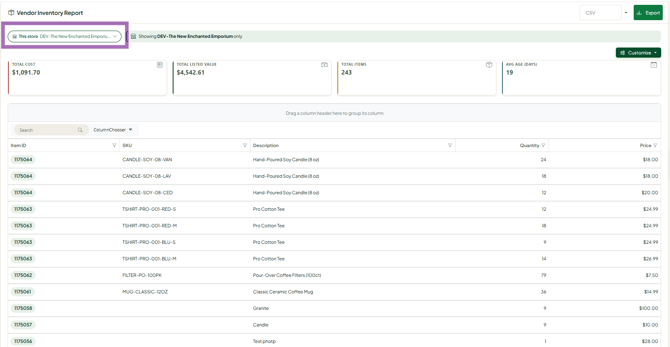
- Reports > Inventory report: the classic Inventory report, with cost, value and age for each item. Check the Store Selector (top right) and Date Range (top left) there.
Fix a $0 or low value
- Click Inventory in the menu.
- On the item's row, open the ... menu and choose Edit item. Click Edit Item if the form opens in view mode.
- Under Basics, enter Cost of Item.
- Click Save Item.
What's on the Inventory report
Cards and charts: Total Number of Items, Total Cost, Total Value, Average Age, Items by Category and Ratio of Items Published to TrinketVault.
Grid columns (add or remove them with the Columns button above the grid):
- Store (if you're a vendor at several stores)
- Item ID (Syncrostore's own ID for the item)
- SKU/UPC, Description, Quantity (on hand now), Price (what you charge now)
- Date Purchased, and Age (days since you bought it)
- Cost (what the item cost you), Original Price (the price when it was added)
- Date Added, Vendor ID, Category, Condition, Brand, Notes, Tags
- Offer Shipping, Publish Local/Online (TrinketVault), Weight, Date Modified
For how to filter, sort, choose columns and export, see "How do I use my vendor reports?".
Troubleshooting
- Value shows $0: your items have no Cost of Item. Add it in Edit item.
- The report and the Inventory page don't match: check that the report's Store Selector is on the store you're signed into, and that no column filter (blue header) is hiding items.
- Items at another store are missing: the Inventory page only shows the store you're signed into. Switch stores with the store name at the top of the page.
