
Go to Settings > Store settings and open the TrinketVault tab. Click Edit, tick Enable TrinketVault for this store, enter your Contact Email, and click Save. After that, items marked for TrinketVault can be published online.
Who this is for: Store admins (store settings need an Administrator login).
These steps use the New Experience. If your menu looks different, click Switch to New Experience at the top of the page.
Steps
- Go to Settings > Store settings and open the TrinketVault tab.
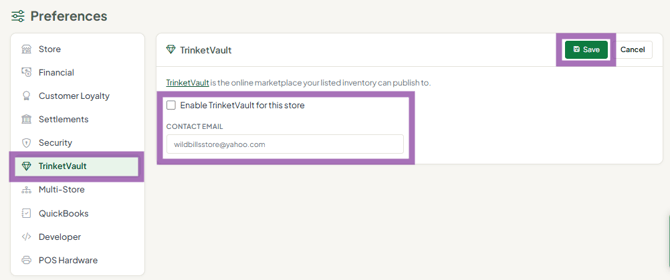
- In the TrinketVault section, click Edit and tick Enable TrinketVault for this store.
- Enter the Contact Email - the email for your TrinketVault (WooCommerce) account.
- Click Save (or Cancel to discard your changes).
After you enable it
- Vendors and staff publish items in the Online / TrinketVault section of the item form by ticking Publish on TrinketVault.
- Ask vendors to fill in Shipping Dimensions (length, width, height and weight), or TrinketVault uses expensive defaults.
Troubleshooting
- Vendors say TrinketVault isn't working: if it isn't enabled here, items won't publish even when vendors tick the box.
- No Store settings or TrinketVault tab: your login isn't an Administrator.
- Items show a 'Used' condition: that field only applies to TrinketVault listings.
