
Payment Confirmation Required (Credit)
If you receive a “Payment Confirmation Required” popup when processing a card payment (see screenshot below):
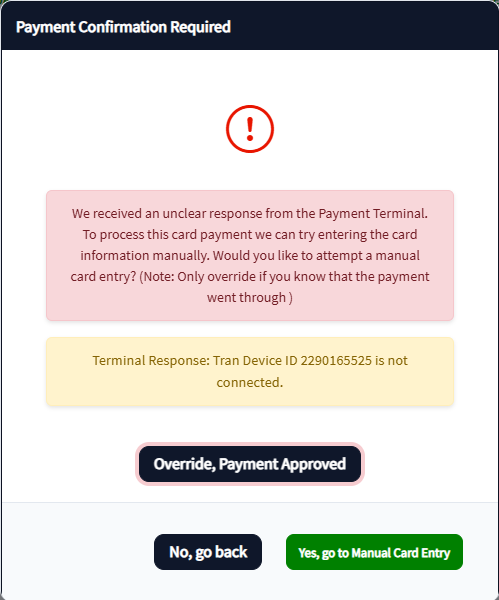
-
Check the terminal screen first
-
If the terminal shows Approved:
-
Click Override: Payment Approved
-
-
If the terminal does not show Approved:
-
Click No, Go Back
-
You can safely attempt the payment again
-
If you accidentally charge a customer twice by clicking No, go back, open a Support Ticket as High Priority and Support will refund the payment.
Change Quantity Error
If Change Quantity errors:
-
Make sure you selected the line item in the grid before clicking Change Quantity
Layaway Item Not Available
If you don’t see Layaway Item:
-
Layaway may be disabled in Admin Preferences
-
Or the item may not meet your store’s layaway rules/thresholds
Layaway Payment Error
If Layaway Payment errors:
-
Select the customer who has the active layaway first
Gift Card Errors
If selling or redeeming gift cards errors:
-
Confirm gift cards are properly set up in Sales → Gift Cards (store setup dependent)
-
Confirm the gift card number is valid and scanned correctly
Tax Exempt Not Applying
Tax exempt will not apply unless:
-
A tax exempt customer is selected
-
Customer has required reseller/tax information on file
