
An "SS-" error almost always means something in your spreadsheet is in the wrong format; the fastest fix is to re-save the file as a CSV, make sure every row has a description, price and quantity, and make sure UPCs are plain digits.
Who this is for
- Vendors and store admins using the Import Wizard.
Fix checklist (do these in order)
- Save as CSV. In Excel or Google Sheets choose Save As / Download > CSV. Excel (.xlsx) files can carry hidden data that breaks the import.
- Required fields on every row: Description, Price (greater than $0, numbers only, no
$), and Quantity (a whole number, not blank). - UPCs must be digits only and 13 digits or fewer. If Excel shows them like
8.60014E+11, format that column as Text or Number with no decimals and re-enter them. Put letters or old-system codes in SKU, not UPC. - Numbers only in number columns. For example, weight
12, not12 oz. - Remove special characters (such as
?) from text, and avoid values like "Checked" in yes/no columns. Verify: accepted values - Map columns carefully. Set any column you don't need (Vendor ID, weight, discount columns) to Do Not Import.
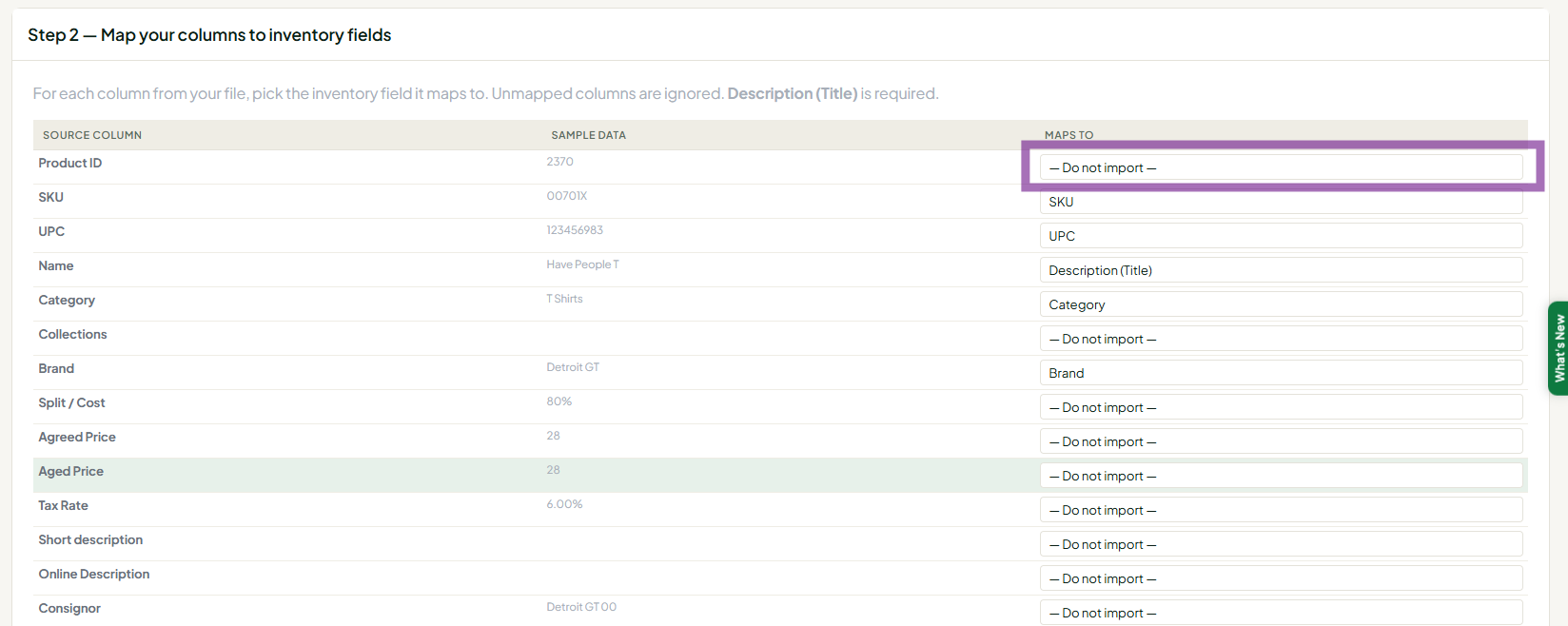
- Variants: every variant row needs its own price, quantity and unique SKU, and the same group key on every row of that item.
- Shopify: a raw Shopify export won't import directly. Follow Importing Your Inventory From Shopify (Including Variant Pricing).
Troubleshooting
- Only the first row (or a few rows) imported: Usually rows sharing one group key (they were treated as variants of one item) or rows missing required fields. Check group keys and required fields, then re-import.
- "There aren't any rows": Re-save as CSV and check the header row is the first row.
- You're logged out during the import: Re-save as CSV and try again outside the overnight update window.
- "Must select a vendor before importing": Make sure you're on your Vendor Inventory page with your vendor selected.
- Still failing: Send support the file and the full SS- reference code.
Related articles
- How do I import my inventory from a spreadsheet?
- How do I import my Shopify products with variants?
- How do I update prices or quantities for many items at once?
