
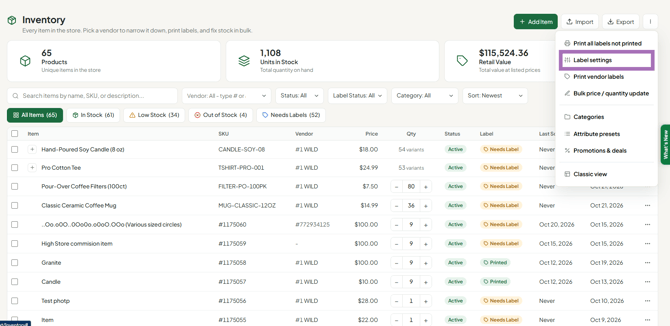
To change your label size, open Inventory, click More (⋮) > Label settings (or tick items and click Print labels, then Change), and pick the format that matches the labels loaded in your printer.
Who this is for: Vendors and store staff who print labels.
These steps use the New Experience. If your menu looks different, click Switch to New Vendor Experience (vendors) or Switch to New Experience (staff) at the top of the page.
Steps
- Go to Inventory (staff: Inventory > All items).
- Open More (⋮) > Label settings to change the size without printing. Or tick items, click Print labels in the bar that appears, then click Change in the Label card.
- Choose the Printer: Dymo, iDPRT & others or Inkjet sheet.
- Choose the Code: Barcode (recommended; works on every scanner) or QR code (only if your scanners read 2D codes).
- Click the format that matches your label stock.
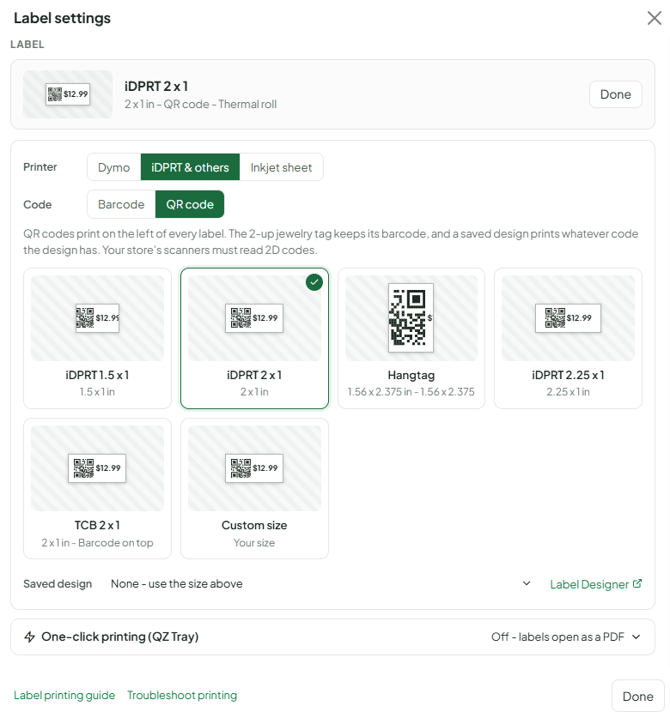
Syncrostore remembers your choice in this browser. If your label isn't listed, use Custom size (width 2–4 in, height 1–3 in) or a Saved design from the Label Designer.
Where did my old label size go?
- Since July 2026, some sizes (such as 1.1 x 3.5 and Generic landscape) are no longer preset formats. Build them with Custom size or the Label Designer.
- 1.5 x 1 is listed under both Dymo (Dymo 1.5 x 1 (30347)) and iDPRT & others (iDPRT 1.5 x 1).
- Hangtag (1.56 x 2.375) is under iDPRT & others.
- On a DYMO, the closest match to a 2 x 1 label is Dymo 2.125 x 1 (30336).
- A store's own designs (such as a store default) appear in the Saved design dropdown. Store staff build these in the classic Label Designer (Inventory > Label designer, or the link next to Saved design in the picker).
Troubleshooting
- Labels print sideways, tiny or cut off after changing size: set the printer's own paper size to the same size in its Printing Preferences, with rotation 0 and scaling 100%.
- I picked Barcode but still get a QR code: you may have a Saved design selected. Saved designs print whatever code the design has. Clear the Saved design selection and pick a standard format.
- Not sure which size your store uses: ask the store. Many stores require a specific label.
