
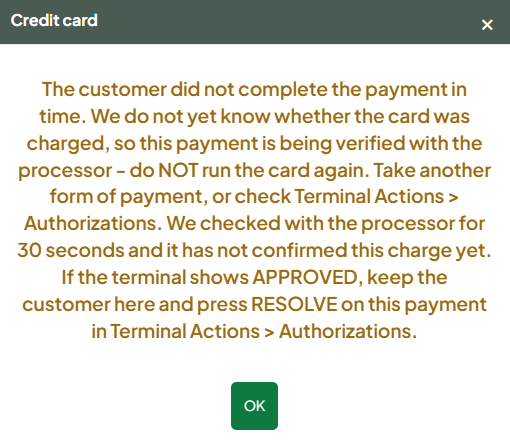
Don't run the card again. If the terminal said Approved but the register didn't complete the sale, the customer has almost certainly been charged. Recover that payment instead of charging the customer again.
Who this is for
- Cashiers and store admins on the register
What you'll see
- An amber message: "The terminal did not answer in time. The payment is being verified - do NOT run the card again."
- Or the sale stays open or spins after the terminal shows Approved.
Steps
- Leave the sale on screen. Don't press Clear All, and don't charge the card again.
- Press Credit again for the same sale. The register first looks for the unresolved payment:
- Approved for the same amount: the register attaches it and shows "Prior authorization recovered - sale completed".
- Approved for a different amount: the register blocks you so you can sort it out deliberately.
- Still being verified: wait a moment and try again.
- If that doesn't complete it, use Terminal Actions > Authorizations. Find the charge marked Unattached and press Attach. If the page was closed or reloaded, ring the items up again first. Attaching doesn't charge the customer again.
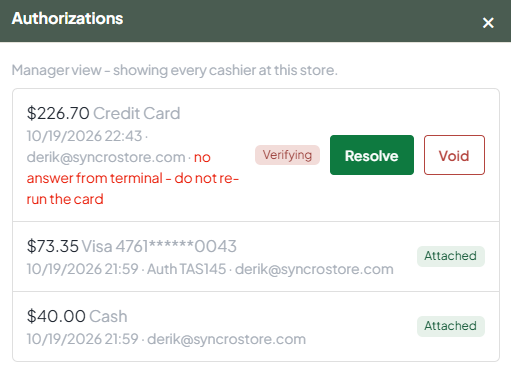
- No Unattached charge listed, but the terminal shows Approved? Ring the items up, press Save for later, and contact Syncrostore support with the time and amount. Support can attach the payment to the saved sale.
- Need a receipt afterwards? Go to Sales > Transactions, search for the transaction, and use the reprint receipt button.
Why it happens
The terminal approved the card, but the reply didn't reach Syncrostore in time, usually because the store's internet or Wi-Fi dropped. It can also happen when the same login is used on two registers at once.
Prevent it
- Give the terminal and register a stable connection. Use wired Ethernet if Wi-Fi drops often. Support has traced repeat cases to store networks (ISP, router, switches, cabling).
- Use one login per register, and log out before moving to another register. Two registers on one login share a cart and can block payments with "another payment is pending".
- Restart a stuck terminal: unplug it, wait 30 seconds, plug it back in. If the first card of the morning keeps timing out, or the terminal shows "downloading", contact support. The terminal may need an update from the terminal provider.
Troubleshooting
- The customer's bank shows an extra pending charge: declined or duplicate attempts can show as pending and usually drop off. Check the terminal's history or your processor portal before refunding anything.
- You charged the card twice: void the extra payment from the Payments tab, or refund it on the terminal. See Viewing and Voiding Payments on a Sale.
- External (Manual) terminal: Syncrostore can't see the charge. Record it with Approved on the register after checking the standalone terminal.
