
General Overview
The Syncrostore calendar serves as a place to view all events related to your store, such as vendor sales, store wide events, and Syncrostore events. It can be found on the top right of any page, just to the right of the notification logo.

Once opened, your view will depend upon your role in the store:
-
As a administrator or manager you can view all current vendor sales being run in your store.
-
As a vendor you can view what sales are currently active for your booth.
Everyone can see important events, such as holidays, store wide events, or Syncrostore events.
Filtering the Calendar
You have complete control on deciding what appears on your calendar. As an administrator/manager, you may not want to view all Vendor sales. As a vendor, you may not care about Syncrostore events.
- Once opened, the left column of the calendar provides control over what is shown in the form of dropdown menus:
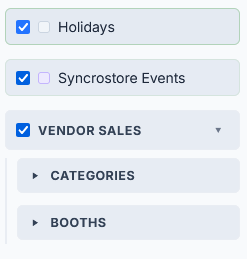
- Currently you can toggle US Federal Holidays, Syncrostore Events, and Vendor Sales.
- Within Vendor Sales, you can decide to show a whole booth (that is all the sales that are contained within that booth), or by store-wide category. Note that multiple different vendors at different booths can have sales running for the same category.
- Syncrostore events are created by our team to announce notice of changes or other important information.
- Simply unchecking the box next to the description of the event will remove it from your calendar.
