
You can't delete or undo a settlement yourself, but Syncrostore support can back it out on the back end if the checks haven't been handed out or the ACH hasn't been sent, so you can fix balances and run it again.
Who this is for: Store owners and admins who run vendor settlements.
These steps use the New Experience. If your menu looks different, click Switch to New Experience at the top of the page.
Before you generate settlements (prevents most problems)
- Post rent for the period on Money > Rent & fees (Charge rent tab), dated on or before the cutoff.
- Post all credits and fees on the Credits & fees tab.
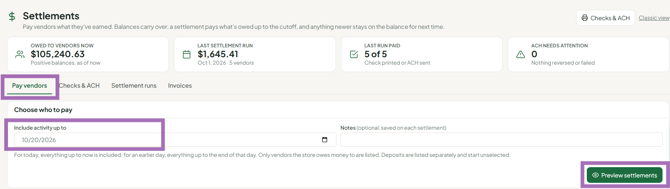
- On Money > Settlements, Pay vendors tab, set Include activity up to (it defaults to today), click Preview settlements, and check every vendor and amount before you click Generate settlements.
If a settlement is wrong
- Don't print or send the payment yet. Don't print the check and don't send ACH for the affected vendors.
- Contact support with your store name, the settlement date, and which vendors are affected (or "all").
- Support backs out the settlement on the back end. Then make your corrections (rent, credits, fees) and generate settlements again.
If you only want to hold one vendor's payment
- Before generating: untick that vendor in the preview. They aren't settled, and their balance carries forward.
- After generating: settlements can't be deleted. Simply don't print that vendor's check or send their ACH. To track where the money is, support's suggested method is to create a store vendor, post a fee to the original vendor and a credit to the store vendor with a note.
Lost or voided check
- Ask your bank to stop payment on the original check.
- Contact support. They can mark the settlement unpaid so you can reprint it with a new check number, with a note referencing the voided check number.
Troubleshooting
- Rent wasn't deducted from the settlement: the rent was probably dated after the cutoff. It will come out of the next settlement, or support can back out this one so you can re-date the rent.
- Settlements were created for every vendor instead of one: stop and contact support before running settlements again.
- A vendor disappeared from the settlement preview: vendors only appear if they have a positive balance before the cutoff date.
