
Your Current Balance is the running total between you and your store. A positive number is what the store owes you; a negative number is what you owe the store, usually rent.
Who this is for: Vendor
These steps use the New Experience. If your menu looks different, click Switch to New Vendor Experience at the top of the page.
How it moves
- When an item sells, your share (sale price minus the store's commission) is credited.
- When the store charges rent or a fee, it is debited.
- Returns, store credits and adjustments are also credits or debits.
- Security deposits are held separately and are not part of your balance.
- When the store runs settlements, a positive balance at the settlement cutoff is paid to you by check or direct deposit, depending on your store.
- The balance is continuous. It doesn't reset monthly. Anything after a settlement's cutoff carries forward to the next one, and a negative balance carries forward too.
Where to see it
- Go to Home and find the Current Balance card. It says "The store owes you this amount", "You owe the store this amount" or "You're all square".
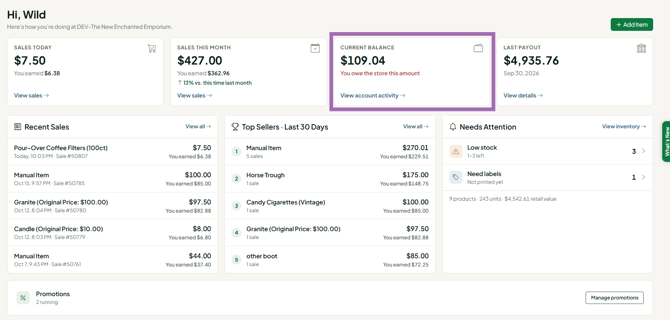
- Click View account activity to see every credit and debit behind the number. (You can also go to Money > Account activity.)
- For a plain-English breakdown, go to Money > Overview and look at Where did my money go?
If your balance is negative
- New sales are applied against the negative balance first.
- You can pay it down according to your store's policy, for example at the register as a rent payment. See "How do I pay my booth rent? (vendors)".
- If your store uses SyncroPay/SyncroACH invoicing, you may receive an invoice for a negative balance. Find it under Money > Payouts & invoices, on the Invoices tab, and click Pay.
- On SyncroPay/SyncroACH stores, you can also use Send money to the store on Money > Overview.
- If you sell at chain of stores under the same login email, a positive balance at one store can be applied against a negative balance at another at settlement time. You're invoiced only for any net amount still owed.
Troubleshooting
- My sales don't match my balance: sales and balance are different figures, and small differences are normal.
- My deposit isn't in my balance: that's expected. It shows in account activity as "Security deposit (held)" and isn't counted.
- I paid rent outside Syncrostore (cash, Zelle, check) and it isn't reflected: ask your store to record it as a credit on your account.
- Something looks wrong: find the specific line in Money > Account activity (date, description, amount) and send it to your store. The store sets and charges rent, not Syncrostore.
