
Your settlement almost never equals your sales total, and in nearly every case that is exactly what should happen: the two numbers answer different questions. This article explains what each screen tells you, why your account carries forward instead of resetting each month, and how to open any settlement and see the individual transactions it paid for.
Who this is for: Vendors (and store owners answering vendor questions)
These steps use the New Experience. If your menu looks different, click Switch to New Vendor Experience at the top of the page.
The one thing to know first
A sales total is not an amount you are owed. It is a list of what sold in a date range you chose. Your check comes from a completely different place: your running account balance with the store, which also includes rent, fees, credits, debits, returns, and anything carried over from before.
So when your sales say one number and your check says another, that is normal. Compare the transactions, not the totals.
Three screens, three different questions
| Screen | What it answers | What it does not include |
|---|---|---|
| Sales | What you sold inside a date range you pick. | Rent, fees, credits, debits, deposits, or any balance carried in from before. |
| Money > Account activity | Every entry that affects your balance: sales, rent, fees, credits, debits, returns and payouts. It is continuous and never resets. | Nothing. This is the complete record. |
| Money > Payouts & invoices | What was actually paid, and the exact lines each payout covered. | Anything that happened after that settlement's cutoff. That stays on your account and goes toward the next one. |
Short version: Sales tells you what you sold. Account activity tells you what is affecting your balance. Payouts tell you what was paid and exactly what was included.
Why your sales total isn't your check
Here is a typical settlement, start to finish:
| Line | Amount | What it is |
|---|---|---|
| Items sold for | $2,000.00 | Gross sales - what customers paid for your merchandise. |
| Your sales share | $1,700.00 | Your portion after the store's commission. |
| Rent, fees & adjustments | -$400.00 | Booth rent, any fees, and any credits or debits on your account. |
| Paid on this check | $1,300.00 | What you were actually paid. |
Nothing is missing here. Every one of those figures is listed separately on the settlement itself. Go to Money > Payouts & invoices, click the payout's Payout # to open the settlement page, and expand What This Settlement Paid For to see each category, then each transaction inside it.
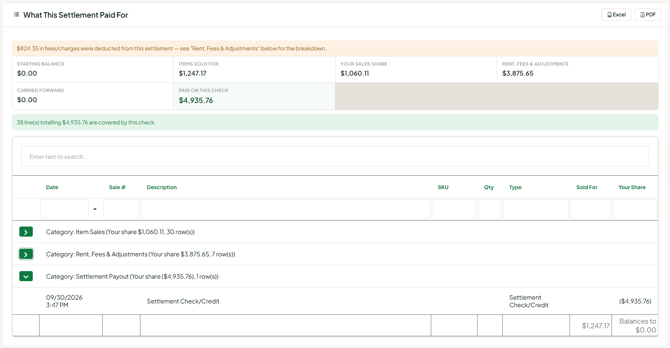
Your account is continuous - it does not reset each month
There is no closed "July account." Your balance runs continuously, and a settlement is a snapshot taken at one specific date and time - the cutoff. Everything eligible on your account at that moment gets paid. Everything after it stays on your account and goes toward the next settlement.
That timing is where most of the confusion starts. Here is a real sequence:
| When | What happened | Where it landed |
|---|---|---|
| Jul 28 | Sale, $510 | Included in the settlement |
| Jul 31 | Rent charge, $10 | Included in the settlement |
| Aug 1, 9:00 AM | Settlement generated - check written | - |
| Aug 1, 4:12 PM | Sale, $591 | Carries forward to the next settlement |
| Aug 4 | Credit, $928 | Carries forward to the next settlement |
That $591 sale on August 1 will show up on your Sales page for July 1 - August 1, but it happened after the settlement was generated, so it could not have been on that check. Both numbers are correct. They answer different questions.
Reading your Account Activity
Money > Account activity is the screen worth getting comfortable with, because it is the complete picture. Click any entry to see all its details. Four rules cover almost everything on it:
- Credits increase what the store owes you.
- Debits decrease what the store owes you.
- Payouts pay you - they appear as their own entries (the Payouts tab filters to them).
- The resulting balance carries forward. If you end a period at -$100, the next one starts at -$100, not at $0. New sales apply against that balance first.
Security deposits: one charge, two entries
If your store funds your security deposit out of money already payable to you, you will see two lines with the same amount and the same time. You were only charged once.
| Date / time | Entry | Amount | Effect on what you're owed |
|---|---|---|---|
| 08/06/2026 10:53 PM | Debit: Security Deposit Funding | -$1,504.00 | Reduces your balance |
| 08/06/2026 10:53 PM | Security deposit (held) - Not part of your balance | $1,504.00 | No effect - record only |
The debit funds the deposit out of money already payable to you. The deposit entry records that money as being held. The money did not disappear - its classification changed.
How to check a settlement yourself
- Open the settlement. Go to Money > Payouts & invoices and click the Payout #.
- Expand Item Sales, Rent/Fees & Adjustments and Settlement Payout. Every underlying transaction is listed.
- See what carried. In Money > Account activity, look at the entries dated after that cutoff and the balance carrying forward. That is the difference between your sales and your check, in named lines.
- Name the line. If something still looks wrong, find the specific transaction - date, description and amount.
Common questions
"My sales report says I sold $X. Why wasn't my check $X?" Because sales are not an amount-due report. Your check comes from your running account balance, which also includes rent, fees, credits, debits, returns, your prior balance and past settlements.
"I ran July 1-31 and got a different number than the settlement." Both can be right. A sale later in the day on the cutoff date appears in July sales but happened after the settlement was generated, so it stays on your account for the next one. Compare the cutoff time, not the month.
"Where did the rest of my sales go?" Nowhere. Open the settlement to see exactly which transactions were included. Anything after its cutoff is still in your account activity and carries forward.
"I had sales, so why didn't I get a settlement?" Sales alone don't guarantee a positive balance at the cutoff. If prior charges, rent or a negative carried balance exceed your credits, there may be nothing to pay out. The Payouts tab shows a Why didn't I get a payout on ? card with the reason. The balance continues forward.
"Why did my negative balance carry into the next month?" Because accounts don't reset monthly. Ending a period at -$100 means the next one starts at -$100. New sales apply against that balance first.
"Why are this month's charges affecting money I made last month?" Settlements run off a continuous ledger, not isolated monthly buckets. A charge entered before the cutoff and eligible for that settlement becomes part of the balance being settled.
"Shouldn't the settlement reset my balance to zero?" Only if it pays your entire eligible positive balance and nothing else has happened since. A settlement doesn't reset your account - it is another transaction on a continuous ledger.
"Why is there activity dated after my settlement?" Because business didn't stop when the settlement was generated. New sales, credits, charges and adjustments start accumulating again immediately.
"You credited me $928 - was my last check $928 short?" Not if the credit was entered afterward. A credit entered on August 4 can't change a settlement that was already generated and paid. It joins your continuing balance and goes toward the next settlement.
"But that credit related to something from last month." What an adjustment relates to and when it entered your account are two different things. Once entered, the credit increases your current running balance. It isn't lost because the original event was earlier.
"Why not reopen the old settlement and correct it?" A settlement is a historical record of what was actually paid at that cutoff. Later adjustments belong on the continuing ledger. Rewriting settlements would destroy the audit trail that lets you verify any payment later.
"My Profit column says $573.53. Isn't that what I'm owed?" No. Profit (on the Cost / profit report) compares the cost you entered on your own inventory against what the item sold for. It shows how profitable your merchandise is. It has nothing to do with the amount payable to you by the store.
"Was commission taken twice?" Each sale has a gross amount, the store's share, and the resulting net to you - and all three are shown separately (on Sales as Sale, Commission and You earned, and in the settlement detail). Seeing them listed side by side is not the same as being charged twice. If a specific sale looks wrong, open it and check that one line.
"I added it up myself and got a different number." Your own records are worth keeping - but before comparing totals, check that you're adding the same set of transactions. A calendar-date sales total is usually not the same transaction set as a settlement cutoff. Compare transactions, not totals.
Troubleshooting: if something still looks wrong
Sometimes there is a genuine error - a sale credited to the wrong vendor, a rent charge entered twice, a return that didn't post. Those are real and fixable, and they can be found quickly when you can point to the line. Contact your store and give them:
- The settlement in question - its date and amount.
- The specific transaction you believe is wrong or missing - its date, description and amount from Money > Account activity.
- What you expected instead, and why.
A difference between your own total and a settlement isn't enough on its own to investigate, because the two are usually counting different things. A named transaction can be traced in minutes.
In three sentences
Sales tells you what you sold. Account activity tells you the activity affecting your running balance. Payouts & invoices tells you what was paid at a cutoff, and exactly what was included.
