
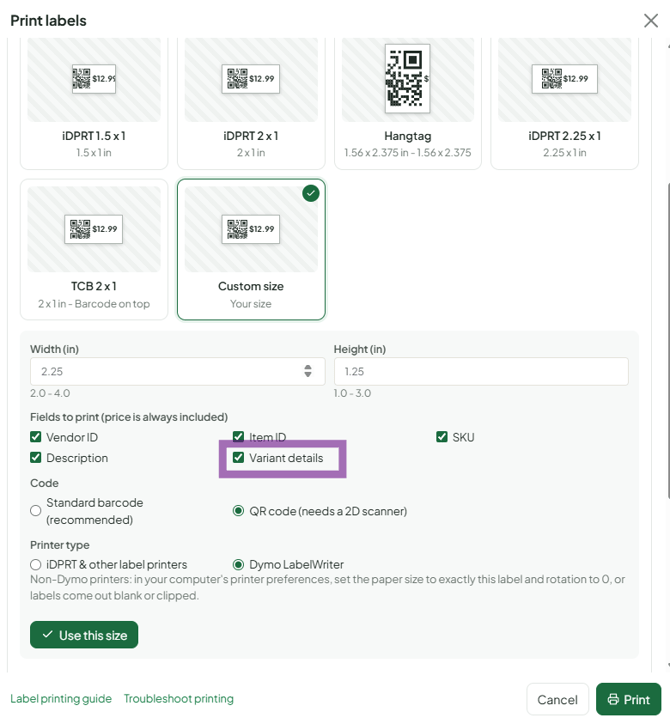
Each variant needs its own price, quantity and a unique SKU. Variant quantities add up to the parent's total. To show size or colour on a printed tag, use a Custom size label with Variant details ticked.
Who this is for: Vendor, Store staff
These steps use the New Experience. If your menu looks different, click Switch to New Vendor Experience (vendors) or Switch to New Experience (store staff) at the top of the page.
Where variants live
- In the item form (Inventory > Add Item or ⋯ > Edit item), the Product Variants section: Define Attributes (Add Attribute, or quick-add a saved preset), then Add Variants (+ Add Variant). "Bulk edit all variants…" sets price, SKU, quantity, cost or size for every variant at once.
- On the Inventory page, items with variants have an arrow ("Show variants"). Expand it to see and change each variant's quantity.
Quantities
- Every variant needs a quantity. The parent's total is the sum of its variants and updates automatically.
- Error "quantity must be more than zero" on save: give each variant a quantity.
SKUs
- Required for every variant; leave it blank to let it auto-generate.
- Must be unique across the whole store, including the parent item's SKU and other vendors' items.
- Keep them short (12 characters or fewer) and uppercase. Allowed characters: letters, digits, space, underscore, apostrophe, comma, hyphen and period.
- Tip: base SKU plus suffix, e.g.
TEE01-S,TEE01-M.
Limits
- Each attribute can have up to 100 values (for example 100 scents). For more, add a second attribute or split the product (e.g. "Candles 1", "Candles 2").
- Variant SKUs can be up to 40 characters and can't contain special characters such as %, < > or @.
Labels and scanning
- If the variant name doesn't print, or is cut off, on your label size: in Print labels, click Change, choose Custom size and tick Variant details under fields to print. You can also design a label in the Label Designer.
- The barcode identifies the exact variant, so the register adds the right variant even if the text is shortened.
- Keep variant names short (S, M, L). Long names get cut off. Variants aren't meant to be descriptions.
Changing variants later
- Removing an attribute regenerates the variants, and you may need to re-enter prices, quantities and SKUs.
- A variant can't be renamed independently of the parent's title. The differences live in the attribute values.
