
Every login has one role that controls what it can see: Administrators see everything, Managers run day-to-day operations, Cashiers use the register and front-counter pages, and Vendors see only their own booth.
Who this is for: Store admins.
These steps use the New Experience. If your menu looks different, click Switch to New Experience at the top of the page.
The menu only shows what a role can open. Some items also depend on your store's plan.
Roles
- Administrator - full access, including Home, People > Users, Settings > Store settings, Money > Rent & fees and the Reports page.
- Manager - the Sales pages, Inventory, Reports and Settings > Activity log. On consignment stores also People > Vendors, Email vendors, Money (Overview, Settlements, Checks & ACH, Invoicing, Account activity), Promotions & deals and the Store map. No Home, Users, Store settings or store notifications inbox. Can approve price cuts with a PIN.
- Cashier - Sales > Register, Transactions, Customers, Gift Cards, Layaway, Cashier Tools and Inventory > All items. No Home. Can't see vendors' personal contact details.
- Vendor - the vendor menu only: Home, Sales, Inventory, Money, Promotions, Reports and Notifications for their own booth. You can turn individual vendor features on or off on the vendor's Access tab.
- Super Admin - for owners of multi-store groups only. Don't use it for a single store; it causes a blank screen. Use Administrator instead.
What each role can open
| Area (menu) | Admin | Manager | Cashier | Vendor |
|---|---|---|---|---|
| Home (store dashboard) | Yes | No | No | Own booth (vendor Home) |
| Settings > Store settings | Yes | No | No | No |
| People > Users | Yes | No | No | No |
| People > Vendors | Yes | Yes | No | No |
| Store Management > Store map | Yes | Yes | Yes | No |
| Money > Rent & fees | Yes | No (the menu item shows, but the page opens for Administrators only) | No | Own rent (Money pages) |
| Money > Settlements | Yes | Yes | No | Own payouts |
| Inventory | Yes | Yes | Yes (All items) | Own items |
| Reports | Yes | No (the menu item shows, but the Reports page opens for Administrators only; managers can open the Cash Drawer and Gift Card Liability reports by their address) | No | Own reports |
| Sales > Transactions | Yes | Yes | Yes | No |
| Sales > Register | Yes | Yes | Yes | No |
| Settings > Activity log | Yes | Yes | No | No |
Change someone's role
- Go to People > Users and click View on the person's row.
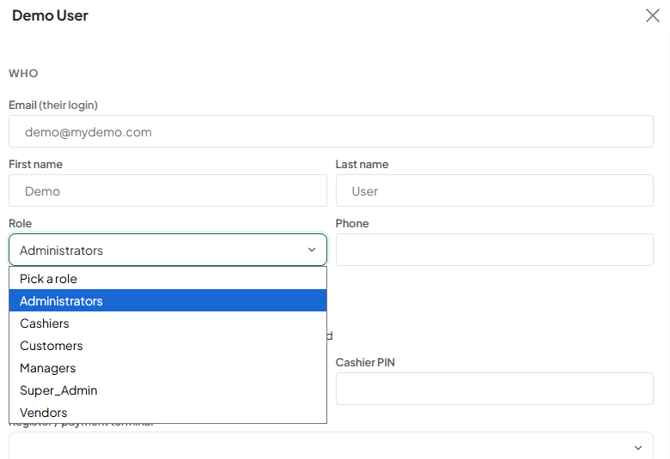
- Change Role and click Save.
- Ask them to log out and back in.
Troubleshooting
- Owner only sees vendor pages: the login was imported as a vendor. Another admin at the store should change its Role to Administrator on People > Users. If there's no other admin, contact support; support has corrected roles at the store's request.
- Blank screen after logging in as owner: the role may be Super Admin on a single store - change it to Administrator and hard refresh (Ctrl+F5).
- Staff member lands in a vendor dashboard: their staff login is linked to a vendor record. Contact support to unlink it, or use a separate email for the vendor.
- A manager gets an access message when opening a page: that page is for Administrators. Check their role.
