
Syncrostore keeps one running balance for each vendor. Sales (minus commission) add to it, and rent and fees subtract from it. When you run settlements, any positive balance up to the cutoff date is paid out. The balance is continuous and never resets: activity after the cutoff, and any negative balance, carries forward to the next settlement.
Who this is for: Store admin (vendors, see "What does my current balance mean, and why is it negative?")
These steps use the New Experience. If your menu looks different, click Switch to New Experience at the top of the page.
How it works
| Event | Effect on vendor balance |
|---|---|
| Vendor's item sells | Credit: sale amount minus store commission |
| Item is returned | Debit |
| Rent is charged | Debit |
| Fee posted on Rent & fees | Debit |
| Credit posted on Rent & fees | Credit |
| Vendor pays rent or balance (at the register, or by invoice/autopay) | Credit |
| Deposit recorded | No effect (tracked separately) |
| Settlement paid | Debit for the amount paid from the positive balance up to the cutoff date. The balance is not reset: anything after the cutoff carries forward to the next settlement. |
Example
| Activity | Amount | Balance |
|---|---|---|
| Rent applied | -$30.00 | -$30.00 |
| Vendor sells product (net of commission) | +$50.00 | $20.00 |
| Settlement run (vendor paid $20.00, no activity after the cutoff) | -$20.00 | $0.00 |
| Rent applied | -$30.00 | -$30.00 |
| No sales this period | n/a | -$30.00 |
| Settlement run (no payout, balance is negative) | n/a | -$30.00 |
| Rent applied | -$30.00 | -$60.00 |
| Vendor pays rent | +$60.00 | $0.00 |
More scenarios (10% commission)
- Positive at settlement: $500 in sales becomes $450 after commission. Subtract $200 rent and the vendor is paid $250.
- Negative at settlement: $100 in sales becomes $90. Subtract $300 rent and the vendor owes $210. No payout. You can invoice them (Money > Invoicing) or collect at the register.
- Paying off a negative balance: The vendor pays $210, bringing the balance to $0.00. They then sell $80 (net) and receive $80 at the next settlement.
Where to see a vendor's balance
- People > Vendors shows each vendor's Balance ("Store owes vendor", "Vendor owes store" or "All square").
- Click View on a vendor. The Current balance card is at the top, and Account > Account activity lists every entry behind it.
- Money > Overview shows the store-wide totals (Store owes vendors, Vendors owe the store).
Run rent and settlements in the right order
- Post all rent, credits, fees and corrections for the period on Money > Rent & fees before you run settlements. Use Date the charges (Charge rent tab) or Date (Credits & fees tab) so they fall on or before your cutoff.
- Go to Money > Settlements, Pay vendors tab, and set Include activity up to (the cutoff). It defaults to today. Change it if you aren't running settlements on the last day of the month. Only activity up to the cutoff is included.
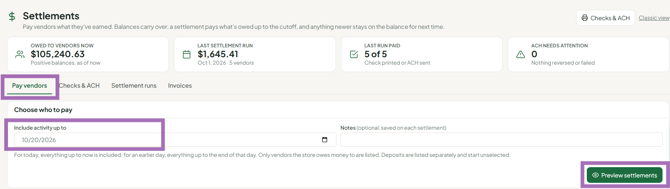
- Click Preview settlements, then Generate settlements. Vendors without a positive balance as of the cutoff don't appear in the preview.
Troubleshooting
- "Double rent": a vendor's settlement shows two months of rent. Rent posts on the date your store picks when it posts rent (Date the charges; often the 1st, but some stores use the last day of the month), and settlements include everything up to the cutoff. If next month's rent is dated before the cutoff, or the prior month was unpaid, two rent charges land in one settlement. Walk the vendor through their account activity.
- Rent wasn't deducted from this settlement. Rent dated after the cutoff (for example, rent dated 8/1 with a 7/31 cutoff) goes into the next settlement. If checks haven't gone out, support can back out the settlement so you can re-date the rent and run settlements again.
- A new vendor owes more than one month's rent. The booth may have existed before the vendor's start date and picked up earlier months' rent. Correct it with a credit on Money > Rent & fees > Credits & fees.
- You need to undo a settlement. Settlements can't be deleted from the app. Contact support to back one out or mark it unpaid (for example, to reissue a lost check).
- Who sets rent? Your store sets and charges rent. Syncrostore only records it.
