
Syncrostore gives every item an Item ID automatically. SKU is your own optional code (required for each variant), and UPC is the manufacturer's digits-only barcode number. Labels printed by Syncrostore encode an internal code, not your SKU.
Who this is for: Vendor, Store staff
The fields
| Field | Who sets it | Rules |
|---|---|---|
| Item ID | Syncrostore, automatically | Unique number per store; searchable at the register |
| SKU | You | Letters and digits allowed. Must be unique store-wide. Optional for plain items, required for every variant. Keep it to 12 characters or fewer. Use uppercase. |
| UPC | Manufacturer | Digits only. Must be unique store-wide. Optional. |
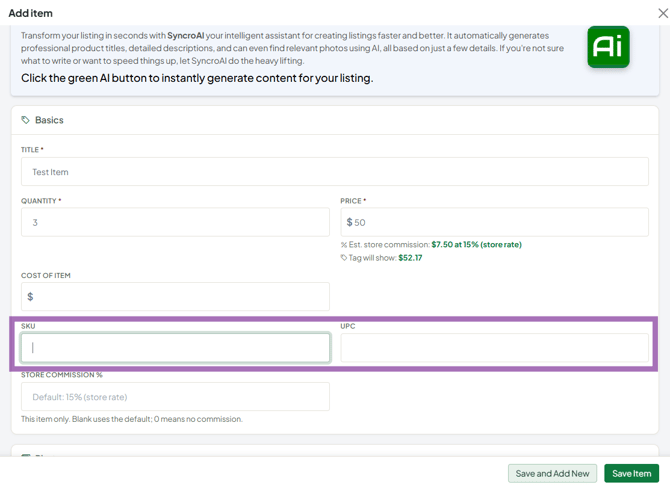
You fill in SKU and UPC in the Basics section of the item form (Inventory > Add Item, or ⋯ > Edit item on an existing item).
What's in the barcode?
Labels printed from Syncrostore encode an internal code, which is why scanning a label doesn't show your SKU. The register can also look items up by SKU, UPC or Item ID, so barcodes you print yourself from your SKU still scan. See "Why doesn't the barcode on my label match my SKU?".
Reusing old tags from another system
Click in the SKU field and scan the old tag with a barcode scanner (or type the code). The old label will then ring up this item, so you don't need to retag. Codes with letters must go in SKU, not UPC.
Variants
SKUs are no longer generated for you. Give each variant its own SKU, e.g. parent 1234, variants 1234-SM, 1234-MD. A variant SKU can't match the parent's SKU or any other SKU in the store.
Troubleshooting
- Save error on UPC: remove letters and spaces. Move alphanumeric codes to SKU.
- "SKU already used": another item in the store (possibly another vendor's) has it. Choose a different SKU.
- My SKU barcodes print squashed or won't scan: shorten the SKU (12 characters or fewer) and use uppercase.
- Can I give one item several SKUs? No. Use variants or separate items.
