
Once a store sends a SyncroPay/SyncroACH ACH payout, it normally reaches the vendor's bank in 1-3 business days. Older Stripe payouts take up to 3-5 business days. Banks don't move ACH money on weekends or federal holidays.
Who this is for: Vendor, Store admin
These steps use the New Experience. If your menu looks different, click Switch to New Vendor Experience at the top of the page.
What to expect
- The store decides when payouts happen. Syncrostore calculates balances, but your store sets the settlement schedule and chooses whether to pay by check or ACH. Ask your store when it runs settlements.
- The store sends the ACH payout. After generating settlements, the store chooses for each vendor whether to print a check or send ACH (it can mix both). Only vendors with a verified bank account can be paid by ACH.
- The bank delivers the money.
- SyncroPay/SyncroACH (Moov): usually 1-3 business days.
- Stripe (legacy): up to 3-5 business days.
- Payouts sent on a Friday or before a holiday arrive after the weekend or holiday.
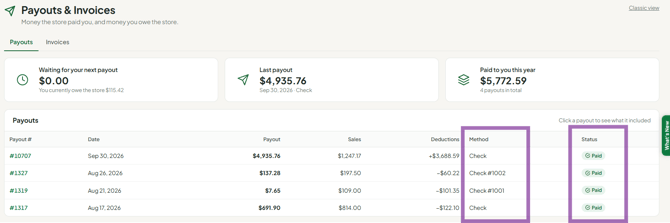
- Check your payout. Go to Money > Payouts & invoices. The Payouts tab lists each payout with its Method and Status (for example Paid, Processing or Payment failed). Click a row to see what you received. For when the money reached your bank, go to Reports > ACH & invoices and look at Transfers to your bank.
- A $0.00 "Stripe Settlement: ACH" line in your account activity is just a transfer marker. The amount paid is shown on the payout itself.
Bank verification timing (first-time setup)
- Verification micro-deposits arrive in 1-2 business days. If you link your bank before 4:15 pm ET on a business day, they can arrive the same day.
- If you link a bank on a weekend, the deposits arrive on the next business day.
- Payouts can't be sent until your bank is verified (avatar > Settings > Payments & Banking). If you aren't verified by payout day, the store may pay you by check that cycle.
If your store still uses Stripe
- Stripe ACH payouts take 3-5 business days after the store sends them.
- Stripe handles the transfer. If it's late, check your Stripe account and emails, and contact Stripe with the transfer confirmation ID.
- A $0.00 "Stripe Settlement: ACH" line in your account activity is a transfer marker; the amount paid is on the payout.
Troubleshooting
- I got an "ACH payout failed" or "canceled" email but my bank is verified. On Oct 1, 2026, payouts were paused while an issue was fixed, and some failure emails were sent by mistake. Those payouts were re-queued and arrived in 1-3 business days. If yours hasn't arrived after 3 business days, contact support.
- It's been longer than expected. Contact your bank first. Then contact support with the payout date and amount. For Stripe payouts, include the transfer confirmation ID and check your Stripe account and emails.
- My bank rejected the payout, or the name on the payout is wrong. Stripe payouts: update your details in Stripe. SyncroPay/SyncroACH: go to avatar > Settings > Payments & Banking and use Wrong account? or Link a New Bank Account. Checks: the name on a check comes from your vendor record, which only your store can change.
- I want a paper check instead of ACH. Payout method is set by your store. Ask the store owner.
