
Check your spam, junk and promotions folders first. If it isn't there, ask your store admin to make sure your email address is correct and to resend the invite. Only your store can send or resend it.
Who this is for: Vendor, Cashier (and the Store admin helping them)
For vendors and staff
- Search your inbox, spam, junk and promotions folders for an email from Syncrostore. Some providers, especially Yahoo, can delay these emails by a few hours.
- Add Syncrostore to your safe-senders list (see "How do I keep Syncrostore emails out of my spam folder?").
- If it still hasn't arrived, ask your store admin to check that your email was entered correctly, with no typos or extra spaces, and to resend the invite.
- When the new email arrives, log out of any other Syncrostore account before you click the link.
- After you finish setup, log in at your store's own address:
https://<yourstore>.mysyncrostore.com/Account/UserLogin. Don't reuse the setup link.
For store admins: resend an invite or confirmation
These steps use the New Experience. If your menu looks different, click Switch to New Experience at the top of the page.
- Go to People > Users.
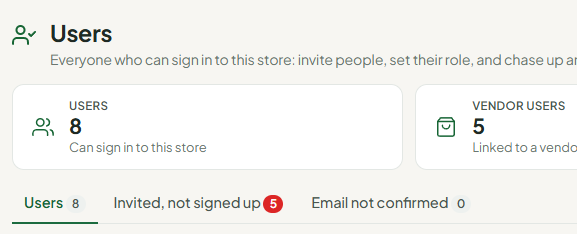
- Open the Invited, not signed up tab to see people who haven't created their account yet. Click Resend invite on the person's row to send it to just them, or Resend all invitations to send it to everyone listed.
- If the person registered but never confirmed their email, open the Email not confirmed tab and click Resend confirmation on their row (or Resend all confirmations).
- If the confirmation link has expired or shows "an error has occurred", click View on the person's row, turn on Email confirmed, and click Save. They can log in right away.
- When you add someone with New user, make sure the option to email an invitation is turned on.
Troubleshooting
- The invite link opens but won't register. Ask the admin for a fresh invite, and log out of other Syncrostore accounts before you click it.
- Still nothing after a few hours. Open a support ticket with your store name and the email address you were invited with.
