
Vendors who have money owed to them can spend it in store. Other Payment Methods → Vendor Balance. Consignment Pro plans only.
Finding the vendor
Search by vendor ID, alias, name or business name. Each result shows "#69 - Wild Bill Hickock" and their Balance.
Applying the balance
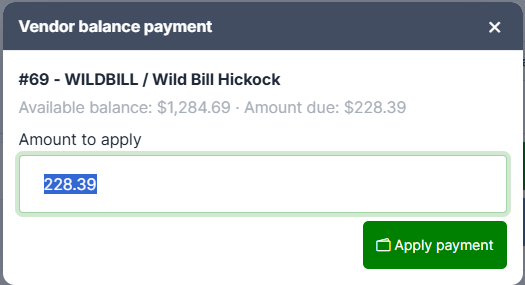
Pick the vendor and the window shows their available balance next to the amount due, with the amount pre-filled at whichever is smaller.
Adjust if needed and press Apply payment.
The vendor's ledger isn't debited until the sale is paid for.
If they don't have enough
You'll get an amber notice:
Insufficient vendor balance. Available 40.00, requested 65.00. A manager override is required.
A Manager override box appears. Nothing has been charged. Type the authorising manager's username and press Apply payment again.
Note for managers: the override is recorded against the payment for audit, but it is typed free-hand — no password is requested and the name isn't checked against a real account. Treat it as a record of who authorized it, not as an access control.
