
Other Payment Methods → Points Redemption. The option only appears if your store runs a loyalty program.
A customer must be attached to the sale — points belong to a person. Without one you'll see "Select a customer to redeem loyalty points."
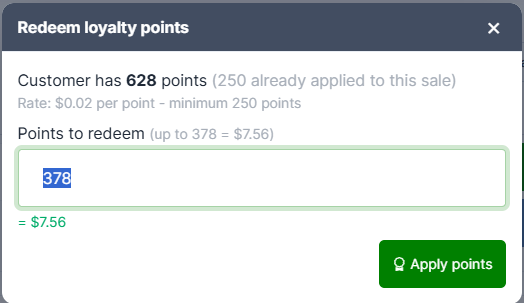
The window shows:
- "Customer has 628 points"
- The rate — "Rate: $0.02 per point" — and any minimum your store requires
- Points to redeem, pre-filled with the most that's worth applying
Underneath, a live preview shows what the points are worth as you type: "= $7.56".
Press Apply points, or press Enter.
The number is already worked out for you
The pre-filled figure is the lower of what the customer has and what the sale still needs — so points are never wasted on a sale that's already covered, and you're never offered more than the balance.
Type a bigger number and it's trimmed automatically rather than rejected. The preview tells you: "(capped at 400 points)".
Points aren't taken until the sale is paid for
Applying points records the tender but doesn't touch the customer's balance. The points come off when the sale finishes. Abandon the sale, or void the tender from the Payments tab, and the customer keeps them.
This also means a partial sale that's saved for later holds the points until it's completed.
Common messages
| Message | Meaning |
|---|---|
| Select a customer to redeem loyalty points. | Attach the customer first |
| Minimum redemption is 100 points. | Your store requires a minimum |
| This customer has no points available to redeem. | Zero balance, or all already applied to this sale |
| Loyalty program is not enabled for this store. | Turn it on in Admin |
