
What’s New
1. Improved Navigation & Layout
- Cash Drawer Management and Customer Display buttons are now located at the top of the POS screen
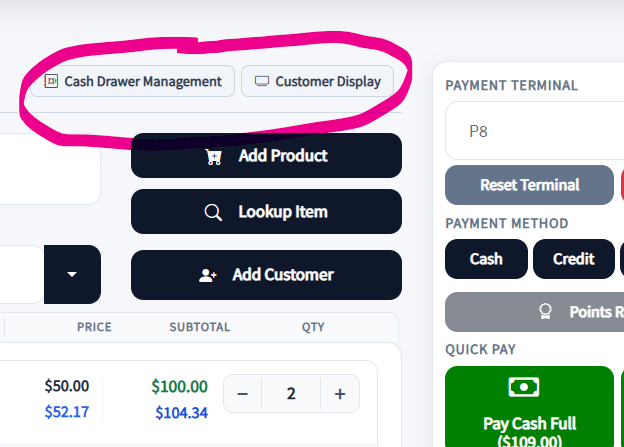
- POS layout optimized to fit on a single page
- Reduced unnecessary scrolling during checkout
👉 Benefit: Faster access to key tools and a more efficient workflow
2. Updated Line Item Grid
Each item in the transaction grid now includes:
- Delete button – Quickly remove items
- Editable Description – Modify item details instantly
- Editable Price – Adjust pricing without leaving the screen
- Quantity (+ / - controls) – Update quantities directly on the item
The “Update All” button has been removed, as changes now apply immediately.

👉 Benefit: Faster edits with fewer steps and less confusion for cashiers
3. Transaction Summary Redesign
- Transaction totals are now displayed in a single horizontal line at the bottom of the grid
- Replaces the previous stacked layout
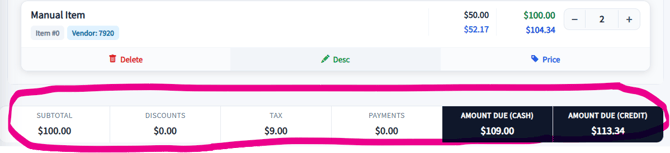
👉 Benefit: Better visibility without taking up extra screen space
4. Discount Notes for Vendor Transparency
- Discounts now allow notes to be entered
- Notes help explain why a discount was applied
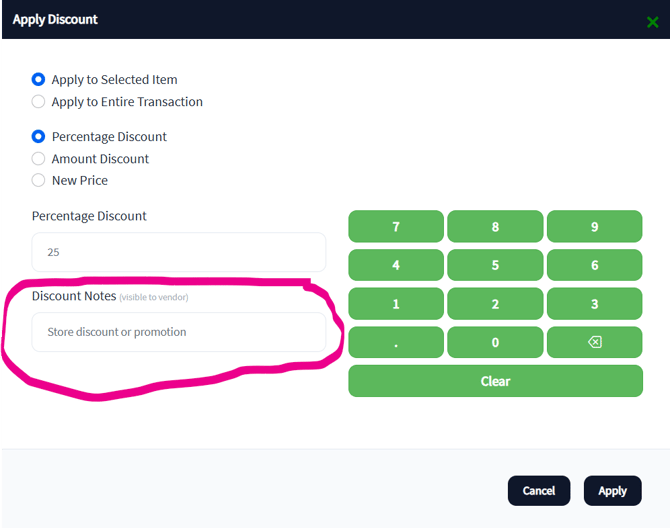
👉 Benefit:
- Improved vendor transparency
- Fewer disputes
- Clear audit trail for adjustments
5. Payment Confirmation Before Sending to Terminal
Previously, users could send credit card amounts to the terminal before confirming the customer’s payment method, which could:
- Cause the POS to wait unnecessarily on the terminal
- Tie up system resources
- Lead to confusion if totals needed adjustment
Now, the system requires confirmation before sending the amount to the terminal, allowing you to:
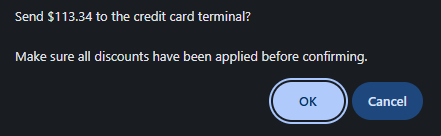
- Verify totals are correct
- Confirm the customer’s payment method first
👉 Benefit:
- Prevents unnecessary terminal calls
- Reduces system load
- Improves transaction accuracy
6. POS Loading Indicator
- A blue Updating.. dialog now appears when the POS is processing or updating
- The dialog automatically disappears once the action is complete
👉 Benefit:
- Clear visual feedback that the system is working
- Reduces confusion during processing delays
Why These Changes Matter
This redesign focuses on:
- Speed at checkout – fewer clicks and faster workflows
- System performance – reduced unnecessary terminal interactions
- Clarity for users – better visibility and feedback
- Vendor trust – improved documentation and transparency
What You Need to Do
No setup is required. The updated POS is automatically applied.
We recommend:
- Reviewing the new payment confirmation step with staff
- Highlighting the quantity controls and discount notes feature
- Explaining the blue Updating dialog so staff know when to wait
Need Help?
If something doesn’t look right or isn’t working as expected:
- Submit a chat with your SyncroAI bot inside Syncrostore
- Include screenshots or a short video for faster resolution
