
This usually happens when the same login is open on two registers at once: the two registers share one cart, so a payment started on one blocks the other and can charge the wrong amount, so every register needs its own login.
Who this is for
- Cashiers and store managers using the Syncrostore register.
Why it happens
The register keeps the current sale on the server, tied to your login, not to the computer. If you're signed in on two registers (or a register and a phone) with the same login, both screens are working on the same cart. That causes:
- "Another payment is pending" and blocked card payments
- A customer charged the wrong amount
- Sales vanishing from one screen, and drawer overages or shortages at closeout
- "Logged in elsewhere" notices
Steps
- Give each cashier their own login, and use one login per register.
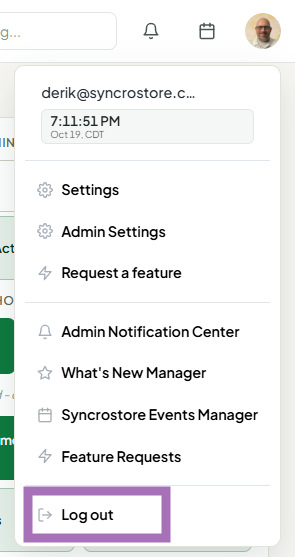
- Before moving to a different register, log out (top-right menu > Log out). Closing the browser window doesn't always end the session.
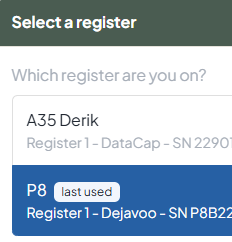
- On the new register, log in and select the register you're on when prompted, so card payments go to that register's terminal.
If it already happened
- Don't run the card again. Check the terminal's history or the processor portal to see what was actually approved.
- If a customer was charged the wrong amount or twice, contact support right away with the transaction ID and time. Support can find and void the wrong charge.
- If a card was approved on the terminal but the sale didn't finish, save the sale for later and contact support so they can attach the approved payment to it.
Troubleshooting
- Refunds go to the wrong terminal: Check that the register selected in the right rail is the one you're standing at.
- "Logged in elsewhere" when you're only on one computer: The account still has an open session somewhere else (another browser or device). Log out there.
