
Click Sales in the menu and choose Today or This month at the top of the page. You can also pick another range or set your own dates.
Who this is for: Vendor
These steps use the New Experience. If your menu looks different, click Switch to New Vendor Experience at the top of the page.
Steps
- In the left menu, click Sales.
- At the top, click a range: Today, 7 days, 30 days, This month, Last month, or This year.
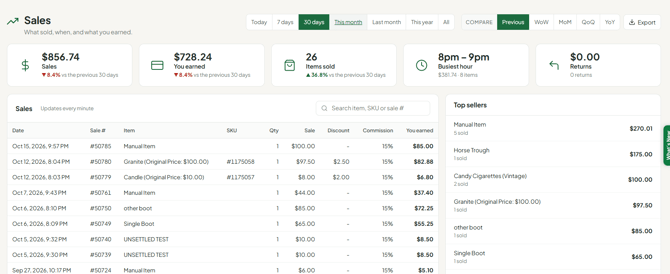
- The cards update: Sales, You earned (after store commission), Items sold, Busiest hour and Returns.
- Scroll down to the Sales table. Each row shows Date (with the time of sale), Sale #, Item, SKU, Qty, Sale, Discount, Commission and You earned. Use the search box to find an item, SKU or sale #.
- To compare with an earlier period, use Compare (Previous, WoW, MoM, QoQ or YoY).
For a quick look, the Sales Today and Sales This Month cards on Home show the same numbers.
When the range includes today, the page updates every minute and tells you when new sales come in.
Exporting or printing
Click Export and choose CSV, Excel (.xlsx) or PDF. Print the PDF for a paper copy. These reports aren't official tax documents.
Troubleshooting
- The page is empty: check the range. If you picked Today and nothing has sold yet, the list is blank.
- The numbers don't match my balance or settlement: the Sales page shows only what sold in the range. It doesn't take out rent or fees, and returns are shown but not deducted. See "Understanding Your Settlement".
- I want charts or the returns detail: click Open the classic sales report at the bottom of the page.
- On my phone: in the mobile app, tap Sales and filter This Month. The website is the source of truth.
- I want a nightly sales email: not available yet. Turn on sale notifications instead (avatar ▾ Settings > Notifications).
