
Go to Money > Payouts & invoices to see every past payout. Click a payout to see what it covered, and click its Payout # to open the full settlement page, where the PDF button at the top right gives you a printable copy.
Who this is for: Vendor
These steps use the New Experience. If your menu looks different, click Switch to New Vendor Experience at the top of the page.
See your payout history
- Go to Money > Payouts & invoices and open the Payouts tab.
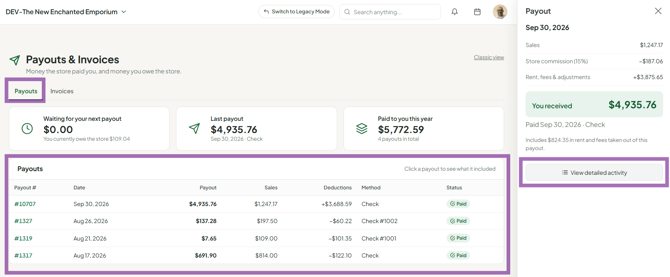
- The table lists payouts from newest to oldest, with Payout #, Date, Payout, Sales, Deductions, Method and Status.
- Click a row for a quick summary: You received, what it Includes, and View detailed activity.
Open the full settlement
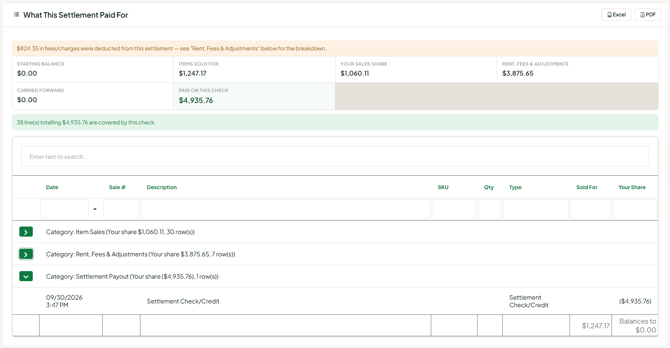
- Click the Payout # on the row. The settlement detail page opens (this page uses the classic layout).
- Review the header: net amount, check number, settlement date and store commission.
- Expand What This Settlement Paid For, then Item Sales, Rent/Fees & Adjustments and Settlement Payout, to see each transaction included.
Print or save it
- Click the PDF button at the top right for a printable copy that includes the full item ledger.
- Or press Ctrl+P (Windows) / Cmd+P (Mac) to print the page as it appears.
- The printout is for your records. It is not a check.
Troubleshooting
- My check doesn't match my sales report: this is normal. See "Why doesn't my settlement check match my sales?". Compare transactions, not totals, and check the cutoff time.
- I didn't get a payout on the last run: the Payouts tab shows a card, Why didn't I get a payout on ?, with the reason (for example, you owed the store, or the store chooses who is paid).
- "Settlements Access Disabled": your store has turned off payouts access for your account. Contact your store owner.
- I can't find the Money menu: make sure you're on your store's address and using the New Experience, then clear your browser cache and cookies.
- The Method column says Check for a payout you got by direct deposit: the Payouts tab marks a payout as Direct deposit when it finds the ACH record for it (older Stripe and current SyncroPay payouts both count). If it still says Check, contact your store or support with the payout date.
- I had sales but no settlement: your balance at the cutoff may not have been positive after rent and fees. It carries forward.
