
Open Money > Account activity. It lists, line by line, everything that changes your vendor balance: sales, rent, fees, credits, debits, returns and payouts.
Who this is for: Vendor
These steps use the New Experience. If your menu looks different, click Switch to New Vendor Experience at the top of the page.
How your balance works
- Credits (sales, store credits) raise what the store owes you.
- Debits (rent, fees) lower it.
- Payouts pay you and show up as their own entry.
- The balance is continuous. It does not reset each month. If you end a period at -$100, the next period starts at -$100.
- Security deposits show as Security deposit (held) — Not part of your balance. They are not counted in your balance.
Open Account Activity
- Log in at your store's own address (
<store>.mysyncrostore.com). - In the menu, go to Money > Account activity. You can also click View account activity on the Current Balance card on Home.
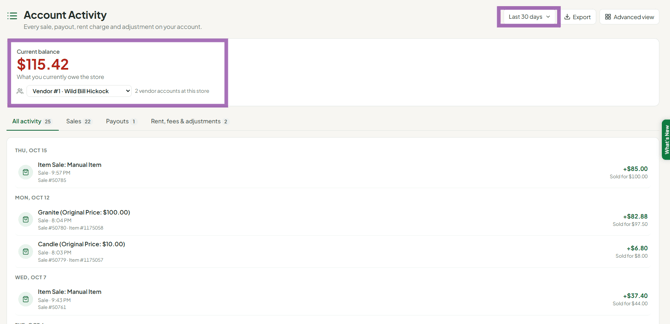
- If you have more than one vendor number at this store, click the store name at the top and pick the right one under Vendor account at this store before you read the numbers.
Reading the page
- Current balance is shown at the top.
- Pick a period: Last 30 days, Last 90 days, This month, Last month, This year or All time.
- Use the tabs to narrow the list: All activity, Sales, Payouts or Rent, fees & adjustments.
- Click any entry to see all its details: what it sold for, store commission, what you earned, type, item, quantity, price, discount, SKU, item #, transaction #, space #, notes and who recorded it.
- Returns show as Item Return: Item entries.
- The page only shows the store you're signed into. To see another store, switch stores first (see "Why does my inventory go to the wrong store? (multi-store vendors)").
Export or dig deeper
- Click Export to download the period as a CSV file. The Counts toward balance column shows which lines are part of your balance.
- For column filters and the full grid, click Advanced view. It opens the classic Account Activity page.
- If a period has a lot of activity, only the newest entries are shown at first. Click Show more, or use Advanced view.
Troubleshooting
- A return isn't in my sales numbers: returns don't reduce the sales cards. Look for Item Return entries.
- A line looks wrong (a sale that isn't yours, a duplicate rent charge, a payment you made outside Syncrostore such as Zelle): contact your store with the date, description and amount. Only the store can correct your ledger.
