
Quick Inventory lets you type in many simple items (title, quantity, price) one after another. Nothing is saved until you click View before Commit and then Commit All.
Who this is for: Vendor, Store staff
Quick Inventory is not in the New Experience menu. In the New Experience the fastest way to add many items is Inventory > Add Item, then Save and Add New after each one.
Using Quick Inventory (classic page, computer only)
- On Inventory, click More (⋮) > Classic view.
- In the Inventory Tools panel on the right of the classic inventory page, click Quick Inventory. The Quick Add Inventory window opens.
- Enter Title, Price and Quantity (required), plus SKU and UPC if you have them. To fill SKU or UPC, click in the field and scan an existing barcode. Staff also pick the Vendor.
- Click Add Item. The item joins a queue; repeat for each item.
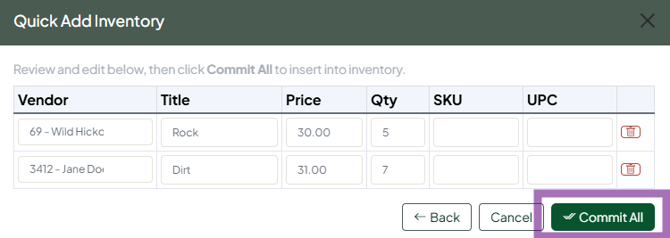
- Click View before Commit to check and edit the queue.
- Click Commit All. Only now are the items added to your inventory.
Good to know
- Quick Inventory doesn't support descriptions, photos, variants or deals. Add those afterwards with ⋯ > Edit item on the Inventory page.
- To restock existing items, don't add them again. Click + in the Qty column on the Inventory page, or use the bulk price / quantity update.
- Video walkthrough: https://youtu.be/PnxXG8I9vRg
Troubleshooting
- My items disappeared: they weren't committed. Leaving or refreshing the page before Commit All discards the queue. Re-enter them and commit.
- Price saved as $0: type the price rather than accepting an auto-filled value.
