
On the Inventory page, tick the items, click Transfer in the bulk bar, choose the store to send to and the vendor at that store, enter how many of each to send, and confirm. Turn on Send SKU & UPC to copy those fields too.
Who this is for: Vendor (selling at more than one store), Store staff
These steps use the New Experience. If your menu looks different, click Switch to New Vendor Experience (vendors) or Switch to New Experience (Beta) (store staff) at the top of the page.
Before you start
- You must have an account at both stores, with the same login email, and the other store must have added you. See "Why does my inventory go to the wrong store? (multi-store vendors)".
- Inventory belongs to one store. Don't try to copy items by switching stores and adding them again. Use Transfer.
Steps
- Vendors: open Inventory. Staff: open Inventory > All items.
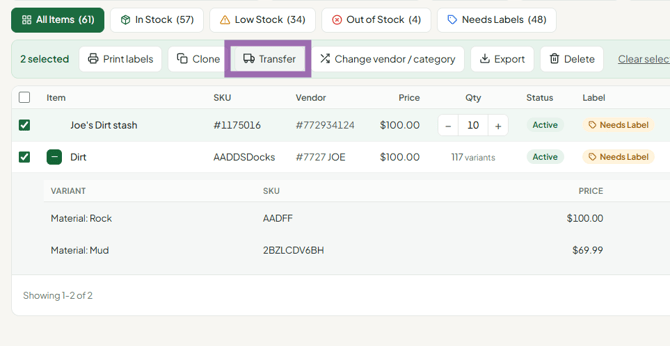
- Tick the checkbox next to each item to transfer. To fit more items on one page, set the page size to 100.
- Click Transfer in the bulk bar.
- In the Transfer to another store window:
- Send to: pick one or more stores.
- Vendor: for each store, pick the vendor at that store. Check this every time, especially as a store admin.
- Take quantity out of this store: turn this on to remove the quantity from the store you're sending from (a real move). Leave it off to copy.
- Send SKU & UPC: turn this on to copy the SKU and UPC. A SKU or UPC already used at the destination isn't copied.
- Send: enter how many to send for each item or variant. It starts at 0. The In stock number shows what you have.
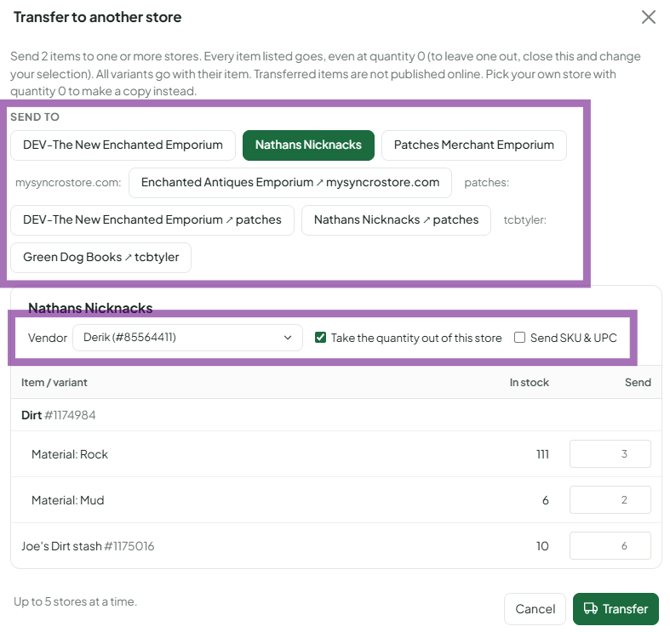
- Click Yes, transfer to… to confirm. This cannot be undone.
The Transfer button in an item's View details panel opens the classic inventory page instead. Use the bulk bar for the window above.
What to expect
- Every item listed goes, even at quantity 0. Untick anything you don't want to send.
- All variants go with their item.
- Transferred items are not published online.
- To make a copy in your own store, pick your own store with quantity 0.
- Item IDs are different at each store. Your labels normally keep scanning at the new store because the barcode code travels with the item. If a label doesn't scan there, reprint it at the new store.
- Categories carry over only if the same category and subcategory exist at the destination. Otherwise they arrive blank.
- Quantity changes later at the destination don't change the original store.
- Large transfers take time, especially items with many images. Wait for it to finish before trying again.
Troubleshooting
- The items went to the wrong vendor: the Vendor was not changed. Transfer again with the right vendor, or ask the store admin to fix it.
- Labels don't scan at the new store after a transfer: reprint them at the new store, or contact support with the item and store.
- The destination store isn't in the list: you don't have an active login at that store yet. Ask that store to invite you, then register through the invite.
- The SKU didn't carry over: make sure Send SKU & UPC was on, and that the SKU isn't already used at the destination.
- The items arrived with quantity 0: the Send quantities were left at 0. Change the quantity at the new store.
