
To get paid by direct deposit through SyncroPay/SyncroACH, link your checking account from your Profile page, wait 1-2 business days for two small test deposits, then enter those two amounts to verify the account. If your store still pays through Stripe, see If your store still uses Stripe below.
Who this is for: Vendors at a store that pays settlements by direct deposit.
Before you start
- Ask your store how it pays you. Payout method and schedule are the store's decision; if there's no direct-deposit option, your store pays by check. SyncroPay/SyncroACH (powered by our payment partner, Moov) is being rolled out to stores in stages, and many stores still use Stripe, so ask your store which system it uses. If your store has switched to SyncroPay/SyncroACH, you must set up your bank again in SyncroPay/SyncroACH even if you used Stripe before.
- Use a checking account that can both send and receive ACH payments. Savings and receive-only accounts are rejected.
- Use the latest Google Chrome on a computer, and turn off any VPN, proxy or iCloud Private Relay. These block the setup page.
- Log in at your store's own Syncrostore address (for example
https://yourstore.mysyncrostore.com). - Never email your full routing or account number to anyone, including support.
- Video walkthrough: https://youtu.be/kRFDtpNxSnk
Set up SyncroPay/SyncroACH direct deposit
- Log in and open your Settings (click Settings in the left menu bar, then Payments & Banking).
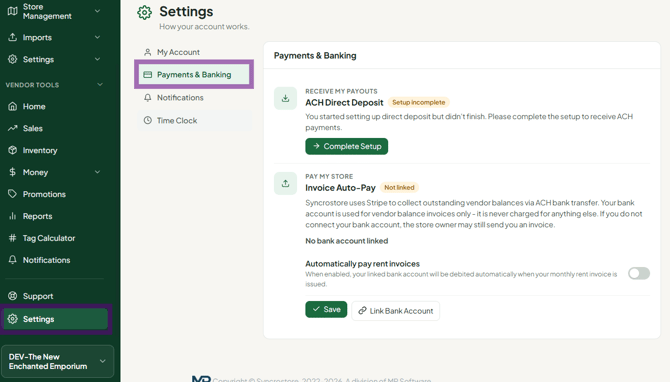
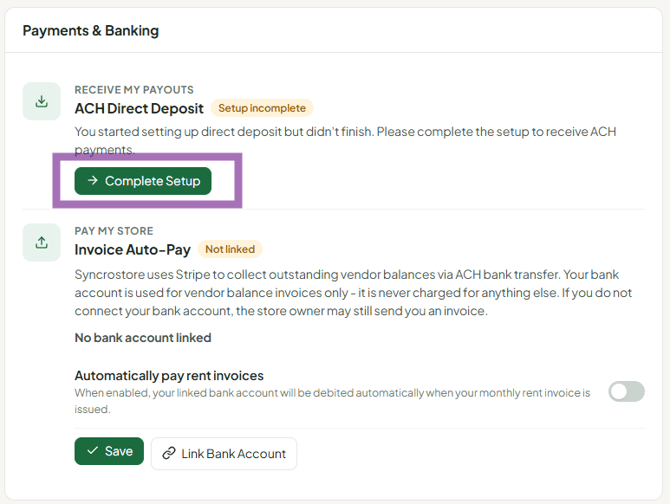
- Find the SyncroPay/SyncroACH / direct deposit section and click the button to start setup. Verify: section name and exact button label - tickets call it the "ACH Setup" button
- Read the terms of service and click I agree.
Screenshot: SyncroPay/SyncroACH terms of service screen with the "I agree" button highlighted - Enter your name and bank details exactly as they appear on your account, then click Save and Continue. This sends two small test deposits (micro-deposits) to your bank. Screenshot: Bank account entry form with the "Save and Continue" button highlighted
- Wait for the two deposits. They usually arrive in 1-2 business days and don't move on weekends or bank holidays. If you link the account before 4:15pm ET on a business day, they can arrive the same day. Verify: 4:15pm ET cutoff
- When both deposits appear on your statement, go back to your Profile, choose Review bank accounts, and enter the two amounts. Screenshot: "Review bank accounts" screen with the two micro-deposit amount fields highlighted
- Once verified, make sure the account is set as your Payout Account. Verify: label
Screenshot: Verified bank account row with "Set as Payout Account" highlighted
Important rules for micro-deposits
- Enter the positive deposit amounts only. You may also see matching negative "clawback" entries; those are the test deposits being pulled back. Ignore them.
- You have a limited number of tries (3). After that you'll see "maximum number of verification attempts exceeded".
- Don't cancel and re-link to "resend" or "speed up" the deposits. Each new link sends a new pair and cancels the earlier ones, and only a limited number of re-sends are allowed before support has to reset your account. If you linked more than once, use the most recent pair.
How do I change my direct-deposit bank account?
Use this if you entered the wrong account, your bank account was closed, or you want payouts to go to a different account.
- On your Settings, link the new account the same way (steps 2-4 above). The bank-linking video shows how to add a second account. This sends two new micro-deposits to the new account.
- When they arrive, open Review bank accounts, enter the new account's two amounts, and set it as your Payout Account.
- After the new account is verified, remove the old or wrong one. Unlinking is done in the Danger Zone section of your Payments & Banking; clicking there unlinks that bank account and deletes its ACH connection, so make sure you pick the right account.
- Do this well before your store's next payout date, since the new account must be verified first (1-2 business days). Ask your store when it runs settlements.
- Wrong details won't save, or the form misbehaves: refresh the page, do a hard refresh (Ctrl+F5 / Cmd+Shift+R) or clear cookies, then enter the details again.
- "Bank linking was canceled" after a wrong routing number: contact support to reset your SyncroPay/SyncroACH setup, then link the correct account.
- Stripe stores: update your bank details in Stripe (see below).
If your store still uses Stripe
- Go to User Icon > Profile > ACH Settlements and click Setup Direct Deposit (or Connect with Stripe). You'll be sent to Stripe's site to verify your bank.
- Stripe verification can take a day or more. If your profile still says pending or "Setup incomplete", wait; don't reconnect.
- A Stripe "verify your bank account" email is from Stripe, not Syncrostore.
- To change your bank or the payout name, update your payout details in Stripe. Stripe handles the transfers.
- The Stripe payment-method section on your profile is for paying invoices, not for receiving payouts.
- Stripe and SyncroPay/SyncroACH are separate: a bank account added in SyncroPay/SyncroACH can't pay old Stripe invoices. Keep your Stripe details until your store confirms it has switched.
Troubleshooting
- Deposits haven't arrived: wait at least 1-2 business days, longer if you linked on a weekend. Check the account you actually linked; each linked account gets its own two deposits.
- "Maximum number of verification attempts exceeded" / account shows Errored: contact support. Support can have the account unlocked and send an instant verification deposit with a 4-digit code in the description, then verify it for you. See Why did my bank verification fail or say maximum attempts exceeded?
- "Could not generate a terms-of-service token" / stuck on "Loading terms of service", or "Bank linking was cancelled": see Why do I get an error when linking my bank account in SyncroPay/SyncroACH?
- The setup link keeps loading: turn off VPN/ad-blockers, clear your cache, try mobile data instead of Wi-Fi, and use Chrome.
- Banking info I entered disappeared: the bank likely rejected it as a savings or receive-only account. Link a checking account.
- A "Danger Zone" section appears after you verify: that's not a status. It's where you would unlink your bank account. Don't click anything there unless you want to remove the account.
- I got an "ACH payout failed" email (Oct 1, 2026): those emails were sent in error. Payouts were paused, not failed, and arrived within 1-3 business days.
- I'm set up but missed this payout: if verification finished after your store ran settlements, you may get a check this cycle and direct deposit next time.
- No direct deposit option at all: your store may pay by check, or your login may be missing the Vendor role. Ask your store.
