
To make a customer tax exempt, set them up as a reseller on Sales > Customers (in the Reseller & ID section) - every sale you attach them to at the register is then tax-free automatically.
Who this is for: Store admin, Cashier
These steps use the New Experience. If your menu looks different, click Switch to New Experience at the top of the page.
Steps
- Go to Sales > Customers. Press View on the customer and press Edit on the Details tab, or press New customer to create one.
- In the Reseller & ID section, tick Reseller (buys for resale) - this is the switch that makes the customer tax exempt at the register. Then fill in Reseller ID, Business name, DBA, Name on driver's license, License state, License number, and tick Name on the ID matches the customer. Your store needs these for tax reporting.
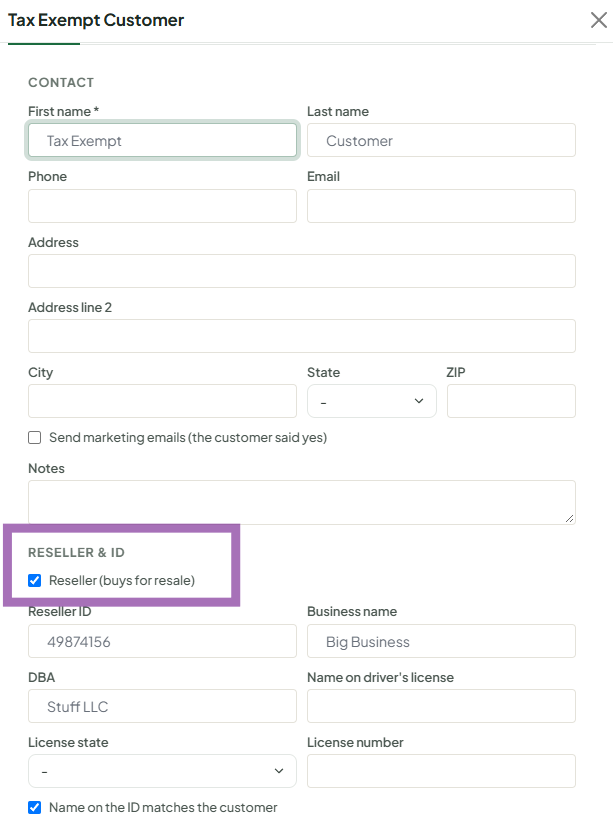
- Save (for a new customer, press Add customer).
- At the register (Sales > Register), attach the customer to the sale. Tax drops to $0.00 and the customer button shows TAX EXEMPT.
Things to know
- There is no tax-exempt checkbox or button on the register. Exemption comes only from the customer on the sale. Remove the customer and tax comes back.
- You can't mark someone as a reseller from the register's "Add a new customer" form - use Sales > Customers.
- Tax exemption covers the whole sale. There is no way to exempt a single line at the register.
- To list all your resellers, use the Resellers chip on the Customers page.
Common situations
- Tax-free holiday, disabled veteran, or other one-off exemption: many stores create a placeholder customer (for example "Tax Exempt Sale") set up as a reseller and attach it to those sales. Ring the tax-free items in a separate sale from taxable items.
- One product should never be taxed (for example event tickets): a store admin opens the item from Inventory > All items (row menu Edit item) and ticks Tax Exempt in the Resell section. Vendors can't set items tax exempt. See How to Mark an Inventory Item as Tax Exempt.
Troubleshooting
- Tax still charged with the customer attached: the customer isn't saved as a reseller. Check them with the Resellers chip on Sales > Customers.
- TAX EXEMPT shows but one line is still taxed: that line has its own custom tax rate.
