
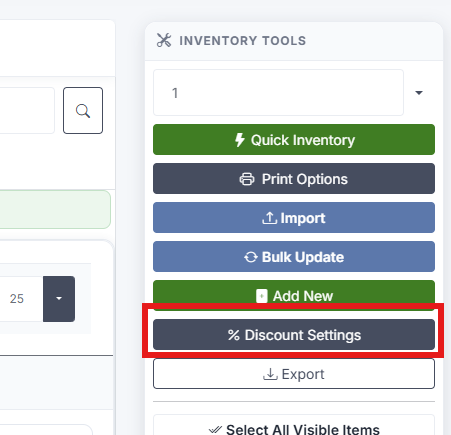
Step 1: On the Inventory page, press the "Discount Settings" button (% icon) in the header.
Step 2: In the popup, enter a Discount Percentage.
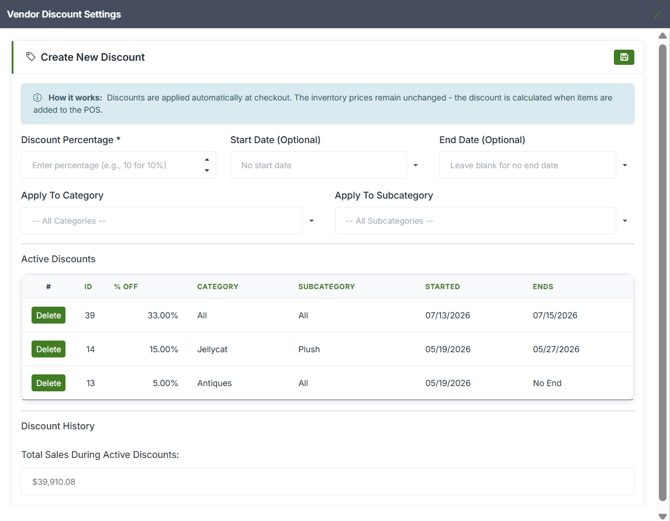
Step 3: Optionally set:
- Start Date — When the discount will begin. If set, the discount starts right away.
- End Date — When the discount expires. If set, the discount ends automatically.
- Apply To Category — Limit the discount to a specific category.
- Apply To Subcategory — Limit further to a specific subcategory.
If no Category or Subcategory is set, the discount applies to your entire inventory.
Step 4: Press "Save." The discount is calculated and applied automatically to qualifying items at the POS checkout.
Notes:
- Only one active discount per scope is allowed at a time (one per category, one per subcategory, etc.).
- Creating a discount will trigger an email to your Admin 48 hours before the start of the discount. If your discount is set to begin any sooner than 48 hours, the email will be sent right away.
- Deleting the discount before the email gets sent will stop the email from going out
- The start and end dates both go to 12am on the day that you select. So selecting 3/4/2026 to 3/5/2026 will run from 12am on the 4th to 12am on the 5th (exactly 24 hours)