
To delete one item, open its ⋯ row menu on the Inventory page and click Delete. To delete several, tick their checkboxes and click Delete in the bulk bar. Deleting is permanent.
Who this is for: Vendor, Store staff
These steps use the New Experience. If your menu looks different, click Switch to New Vendor Experience (vendors) or Switch to New Experience (store staff) at the top of the page.
Delete a single item
- Vendors: open Inventory. Staff: open Inventory > All items. Find the item.
- Click the ⋯ at the end of its row and choose Delete.
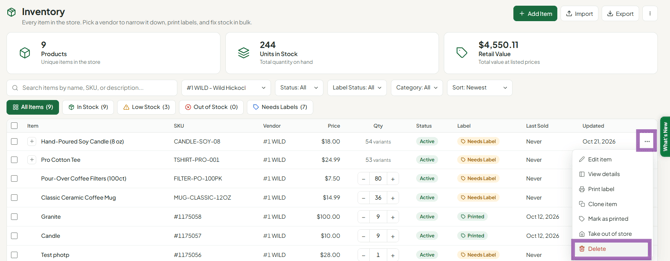
- Confirm.
Delete several items (computer only)
- Tick the checkbox next to each item you want to remove. The bulk bar shows "N selected". To fit more items on a page, set the page size to 100.
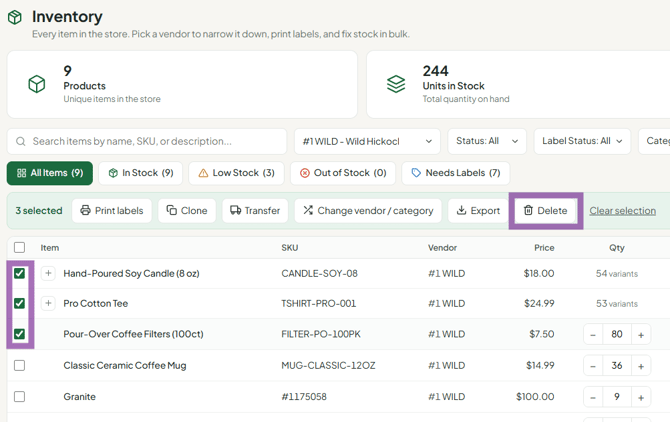
- Click Delete in the bulk bar and confirm.
Before you delete
- There's no undo. Support can't restore deleted items. Export your inventory regularly as a backup with Export ▾ (see "How to Export Inventory Data").
- Sales history stays. Past sales and commissions are kept even after an item is deleted.
- Labels for deleted items won't scan. The register shows "product not found"; the cashier can ring it as a manual sale using the vendor number on the tag.
- Just taking it off the floor? Use ⋯ > Take out of store instead of deleting.
Troubleshooting
- I can't delete on my phone: the mobile app doesn't support deleting items. Use a computer.
- I don't see Delete: inventory management may be turned off for your account. Contact your store owner.
- I have duplicate items (one misspelled): items can't be merged. Delete one and edit the other.
