
After you generate settlements, go to Money > Checks & ACH. Print checks for a whole run on the Print checks sub-tab, send every eligible ACH payout on the ACH payouts sub-tab, or pay vendor by vendor from the Settlement runs tab.
Who this is for: Store administrators and managers.
These steps use the New Experience. If your menu looks different, click Switch to New Experience (Beta) at the top of the page.
Which payment system does your store use? SyncroPay/SyncroACH (powered by Moov) is being rolled out to stores in stages. It started as a pilot in September 2026, and many stores still pay vendors by ACH through Stripe, which is supported until it is decommissioned on January 1, 2027. The SyncroPay/SyncroACH steps come first below. If your store still uses Stripe, follow If your store still uses Stripe further down. Not sure which one you're on? Contact support.
Pay by check
- Go to Money > Checks & ACH and open the Print checks sub-tab.
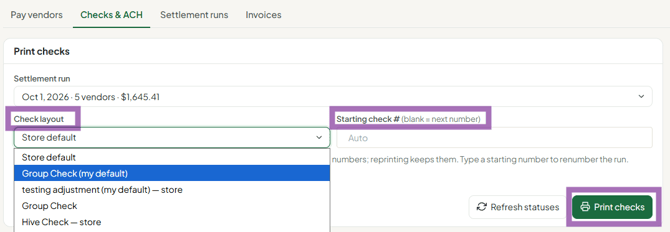
- Choose the Settlement run.
- Choose the Check layout (your saved check designs from Money > Check designer).
- Enter the Starting check #, or leave it blank to use the next number.
- Click Print checks. Use Refresh statuses afterwards to update the list.
- To print just one vendor's check, open the Settlement runs tab and click Print check on that settlement (or Reprint for one already printed). Print this run's checks prints the whole run from there.
Generating settlements doesn't commit you to a payment method. You can print the whole run, send ACH to everyone eligible, or mix the two.
Pay by ACH with SyncroPay/SyncroACH
Vendors can only be paid by ACH after they've linked and verified a checking account (savings accounts can't be used).
- Go to Money > Checks & ACH and open the ACH payouts sub-tab.
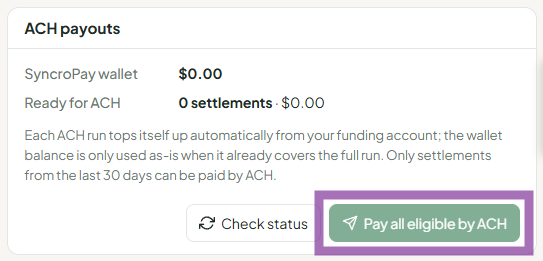
- Click Pay all eligible by ACH to send every eligible payout at once. Only settlements from the last 30 days can be sent.
- Or, on the Settlement runs tab, click Send ACH on one vendor's settlement.
- Click Check status to update ACH statuses.
- Pay any vendors who aren't set up for ACH by check.
Good to know (SyncroPay/SyncroACH)
- Once a settlement is paid by ACH, you cannot print a check for it.
- Timing: SyncroPay/SyncroACH ACH payouts usually arrive in 1-3 business days. The same-day cutoff is 4:15 pm ET: payouts sent after that start processing the next business day. Banks don't process on weekends or holidays.
- Funding: SyncroPay/SyncroACH uses a digital wallet that pulls payout funds from your store's linked bank account and pays vendors from it. You don't need to pre-fund it or keep a balance: the pull from your bank starts when you send payouts. The ACH payouts sub-tab shows the wallet balance.
- Fees: see SyncroACH pricing and details. Your store may choose to absorb vendor fees.
- ACH needs attention: the ACH needs attention card and the Settlement runs chip of the same name list failed, reversed or expired payouts.
If your store still uses Stripe
Stripe does not pull money from your bank automatically. You must load your Stripe balance with enough money before you pay vendors by ACH.
1. Check your Stripe balance against what you owe
- Go to Money > Checks & ACH and open the ACH payouts sub-tab. It shows your Stripe balance. Click Check status before you pay.
- You can also see the balance in your store settings: go to Settings > Store settings, open the Settlements tab, and find the ACH Balance panel. Available is what you can send now; Pending is money in transit. Click Refresh Balance to update it. Your Stripe balance should meet or exceed what you owe to Stripe-connected vendors.
2. Add funds if you're short
- Transfer money from your bank to Stripe in your Stripe Dashboard (outside Syncrostore).
- Stripe top-ups take about 5 business days. Check the Top-ups page in your Stripe Dashboard to see when the money will land, and plan ahead of settlement day.
3. Send the payouts
- Click Pay all eligible by ACH on the ACH payouts sub-tab, or Send ACH on each settlement in Settlement runs.
- Stripe pays eligible vendors (positive settlement balance and Stripe ACH setup completed) one at a time until your Stripe funds run out.
- If the money runs out before everyone is paid, print checks for the remaining vendors, or reload your Stripe balance and pay them once the funds arrive.
- Stripe ACH payouts take 3-5 business days to reach the vendor's bank.
- You can still print checks for ACH-eligible vendors if you prefer.
Troubleshooting
- Vendor got an "ACH payout failed" email (SyncroPay/SyncroACH): in early October 2026 these were sent in error while payouts were paused. The payout was re-queued; tell the vendor to allow 1-3 business days.
- Vendor not eligible for ACH: they haven't finished linking/verifying their bank. On People > Vendors, the Needs direct deposit setup chip lists them. Send them the vendor direct-deposit guide (video: youtu.be/kRFDtpNxSnk).
- Stripe ACH balance shows ERROR: the Stripe secret key saved in Syncrostore doesn't match your Stripe key. Re-enter your keys under Settings > Store settings > Settlements, or contact support.
- Stripe top-up hasn't arrived by settlement day: print checks for this run instead. Generating settlements doesn't lock in ACH.
- Vendor wants a paper check instead of direct deposit: that's your store's choice - print their check.
