
Your vendor Home page is the first page you see after logging in. It shows today's and this month's sales, your current balance, your last payout and what needs your attention. The menu on the left takes you to Sales, Inventory, Money, Promotions, Reports and Notifications.
Who this is for: Vendor
These steps use the New Experience. If your menu looks different, click Switch to New Vendor Experience at the top of the page.
Before you start
- Log in at your store's own address,
https://<store>.mysyncrostore.com. support.syncrostore.com is the help site, not the app, and there is no generic login page. - Use a computer with Google Chrome for the full experience. The mobile app shows less.
What's on Home
- Sales Today and Sales This Month: what sold and what you earned. Click View sales for the full list.
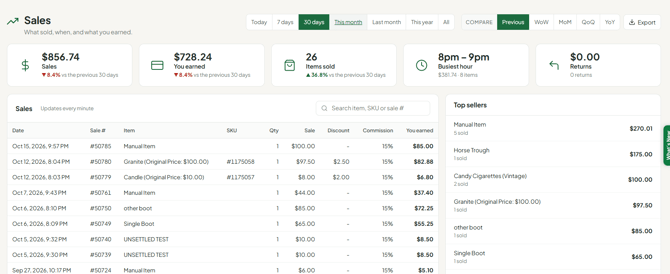
- Current Balance: "The store owes you this amount" or "You owe the store this amount" (usually rent). Click View account activity to see every line.
- Last Payout: your most recent payout. Click View details or All payouts.
- Recent Sales and Top Sellers · Last 30 Days.
- Needs Attention: low stock, out of stock, items that need labels and items not sold in 90 days. Click View inventory to act on them.
- Promotions: sales you have running. Click Manage promotions to start one.
- Add Item (top right) opens the add-item form.
For charts and trends, click Open sales analytics at the bottom of Home. This opens the older customizable dashboard.
Switching vendors vs switching stores
- Home always shows the store you're signed into. It has no store dropdown.
- To work in another store, or to switch between two vendor numbers at the same store, click the store name at the top of the page. This opens Switch store or vendor. Do this before you add inventory or print labels for another store.
Troubleshooting
- No vendor menu: check that you're on your store's address (not the help site), then clear your browser cache and cookies. The vendor menu is only on Consignment/Antique plan stores.
- Cards look cut off: zoom out (Ctrl - / Cmd -).
- Home sales don't match my Current Balance: they are different figures. Sales are what sold; the balance also includes rent, fees, credits and returns.
- I see a $0 or old vendor number: an old vendor record may still exist. Ask your store to deactivate it.
- Another vendor's sales appear on my Home page: a vendor ID was probably assigned wrongly. Contact your store.
- I need to connect QuickBooks: that's only on the older Profile page. See "How do I connect QuickBooks Online? (vendors)".
