
Every inventory item shows a label status, Printed or Needs Label, so you can print labels only for new or changed items. On Inventory, click the Needs Labels chip, then open More (⋮) > Print all labels not printed.
Who this is for: Vendors and store staff.
These steps use the New Experience. If your menu looks different, click Switch to New Vendor Experience (vendors) or Switch to New Experience (staff) at the top of the page.
How the label status works
- The Label column on the Inventory page shows Printed or Needs Label for each item.
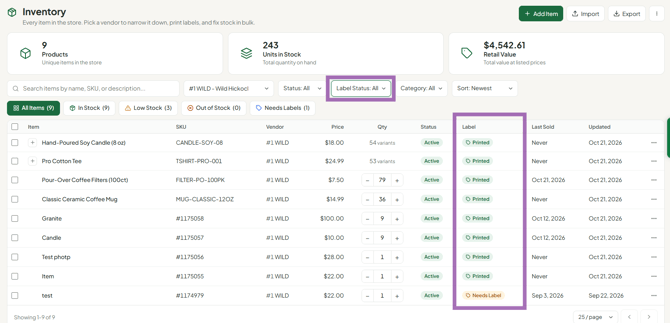
- Printing labels through Syncrostore marks those items Printed automatically.
- Saving an item sets it back to Needs Label, because the information on its tag may have changed. Moving an item to another vendor does the same.
- The status is for tracking only. It never stops you reprinting a label, for example if one fell off or misprinted.
Print labels only for new or changed items
- Go to Inventory (staff: Inventory > All items; pick a vendor in the Vendor box to narrow it down).
- Click the Needs Labels chip, or set Label Status to Needs label.
- Open More (⋮) > Print all labels not printed. It prints every item marked Needs label within your current filters.
- Check the format and the counts under How many of each, then click Print. See "How do I print price tags and barcode labels?".
To print just some of them, tick those items instead and click Print labels in the bar that appears.
Change the status by hand
Open an item's row menu and choose Mark as printed or Mark as needs label, for example if you printed labels outside Syncrostore.
Troubleshooting
- I need to mark my whole inventory as printed: there's no bulk option. Use the row menu.
- Items still show Needs Label after printing: refresh the page. If it persists, contact support with an Item ID.
