
Only store admins can mark items tax exempt. Vendors can't set this themselves. If you're a vendor, ask your store which items to exempt. Admins tick Tax Exempt in the item's Resell section.
Who this is for: Store admin (vendors: read "If you're a vendor")
These steps use the New Experience. If your menu looks different, click Switch to New Experience at the top of the page.
For store admins
- Go to Inventory > All items and open the item with ⋯ > Edit item (or create it with Add Item).
- In the Resell section, tick Tax Exempt.
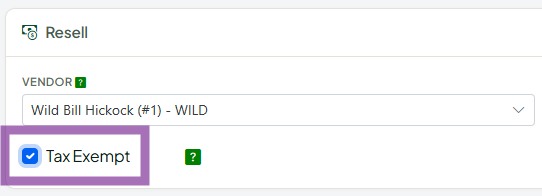
- Click Save Item. Sales tax won't be charged on that item at the register or on TrinketVault.
- There's no bulk tax-exempt edit; each item is edited separately.
- To audit, use Export ▾ (CSV or Excel). The file uses the import template format, which has a Tax Exempt column.
- In the import template, Tax Exempt means the item is sold tax-free to customers, not that you bought it tax-free wholesale.
If you're a vendor
- Vendors can't tick the Tax Exempt box (this changed in July 2026 to protect stores from tax liability). Send your store the Item IDs you believe should be exempt.
Making a whole sale tax-free instead
For one-off exemptions (resellers, tax holidays, exempt organisations), the cashier attaches a reseller customer to the transaction. Set the customer up in Sales > Customers (Reseller & ID details). The box that makes them tax exempt is Reseller (buys for resale) in that section. Exemptions can't be applied to a single line at the register.
Troubleshooting
- Items I'd set as exempt are no longer exempt: after the July 2026 change an admin must re-set them.
