
Open the invitation email from your store, create your password, confirm your email, and then log in at your store's own web address, https://<yourstore>.mysyncrostore.com. A generic Syncrostore page or the support site won't find your account.
Who this is for: Vendor
Steps
- Find the invitation email. Your store creates your vendor account and sends the invite. Syncrostore support can't create accounts or send invites. If you don't see the email, check your spam, junk and promotions folders.
- Log out of any other Syncrostore account first. If you already sell at another store, log out there before you click the new store's link. Otherwise the link may open the wrong account.
- Click the setup link and enter your password twice. Both entries must match exactly. Click Submit. Screenshot: Password setup page, highlight the two password fields and the Submit button
- Confirm your email. Syncrostore sends a second email. Click Confirm (or Verify My Account). You can't log in until your email is confirmed.
- Log in at your store's address. Go to
https://<yourstore>.mysyncrostore.com/Account/UserLogin, enter your email and the password you just created, and click Login. Ask your store for the exact address if you don't have it. To bookmark it, in Chrome open the three-dot menu and choose Save and share > Create shortcut.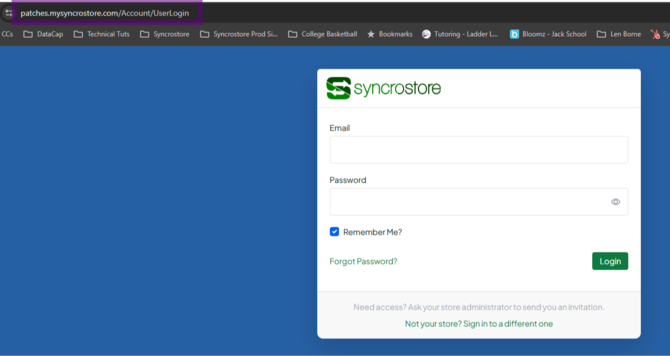
- You'll land on your Vendor Dashboard, which shows your sales, inventory, current balance and reports.
Don't go back to the setup link after you've registered. Clicking it again after registering shows an error. Always use your store's login page instead.
Selling at more than one store
Each store sends its own invite, and you must register separately at each one. If both stores use the same email, you can switch between them from the store name at the top of the screen (see "Why does my inventory go to the wrong store? (multi-store vendors)"). Always check the store name at the top before you make changes.
Troubleshooting
- "Account not found" or "no user registered with this email." Your invite hasn't been accepted or confirmed yet, or the store used a different email. Find the invite or ask your store to resend it.
- "Your store has its own sign-in page, please re-enter your password." You were redirected to your store's login. Enter your password again there.
- "An error has occurred" when you click the link. You've probably already registered. Go to your store's login page instead. If the link has expired, ask your store to resend it.
- The login page goes blank or shows "connection not private". Make sure the address starts with
https://and uses your store's subdomain. Turn off any VPN, or try a different network (for example, cellular instead of Wi-Fi). - The email never arrived. See "I never got my account setup email. What should I do?".
- You need to change your email or Vendor ID. Ask your store. Store admins can change a vendor's contact or login email themselves with the Change Email / Access tool on the Users page. If the store can't make the change, it can ask Syncrostore support, which can update emails or Vendor IDs in some cases at the store's request.
