
Go to Money > Settlements, open the Pay vendors tab, set Include activity up to (the cutoff date), add optional notes, click Preview settlements to review each vendor's payout, then click Generate settlements - after you've posted all rent, credits and fees for the period.
Who this is for: Store administrators and managers.
These steps use the New Experience. If your menu looks different, click Switch to New Experience (Beta) at the top of the page.
Before you start
- Post rent and every credit, fee and correction first (Money > Rent & fees), dated on or before the cutoff date you'll use. Anything dated after the cutoff goes into the next settlement.
- Settlements can't be deleted from your side once generated, so check carefully.
Steps
- Go to Money > Settlements. (Use the Money menu, not Vendor Tools > Money. The Vendor Tools pages only show a vendor linked to your own login.)
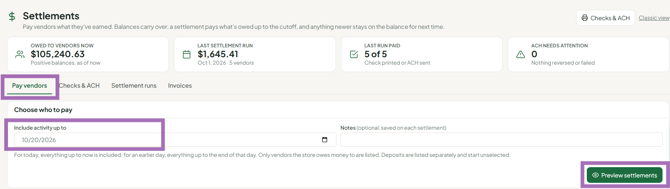
- Check the Owed to vendors now card - the total owed to vendors with a positive balance.
- On the Pay vendors tab, set Include activity up to. It defaults to today. Sales and rent through this date are included; later activity rolls into the next settlement. If you're settling last month a day or two late, change it to the last day of that month.
- Optionally type Notes to keep with this run.
- Click Preview settlements.
- Choose who to pay and how much. Use Select all / Select none, untick anyone you don't want to pay this run, and adjust amounts if needed. Deposits start unselected. The page warns if an amount is more than the vendor's balance. Use Export CSV if you want a copy.
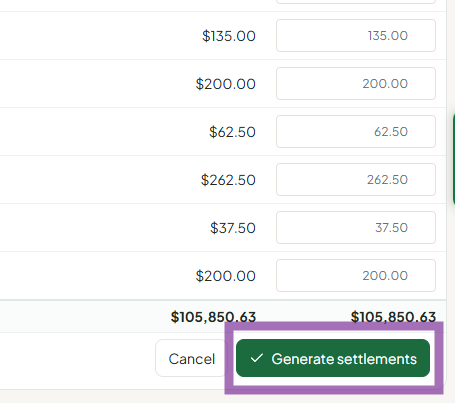
- Click Generate settlements and confirm. Vendors are notified, and the run is sent to QuickBooks if your store uses it.
- Pay vendors by check or ACH on the Checks & ACH tab - see How do I pay vendors after running settlements? (checks or ACH). Generating doesn't lock in a payment method.
View past settlements
- Open the Settlement runs tab. Runs are listed by date. Use the chips All runs / Not fully paid / ACH needs attention, or search by vendor, vendor #, settlement # or check #.
- To see one vendor's settlements and what each paid for, go to People > Vendors, click View on the vendor, and open the Settlements tab.
- For a date-range view, go to Reports, and under Vendors choose Vendor Settlements.
Good to know
- Multi-store vendors (SyncroPay/SyncroACH): if a vendor has a positive balance at one store and a negative balance at another under the same email, the balances are netted at settlement. An invoice is sent only for any remaining negative balance.
- Vendors who owe more than their sales (rent larger than sales) aren't paid. Their negative balance carries forward, or you can invoice them from the Invoices tab.
Troubleshooting
- A vendor is missing from the preview: they had no positive balance as of the cutoff date. Check their account activity.
- Rent wasn't deducted: rent was dated after the cutoff, or not posted yet. If checks haven't gone out, contact support to back out the settlement, then post rent and settle again.
- Need to hold one vendor's payout: untick them in the preview before you click Generate settlements. If the settlement is already generated, don't print their check or send their ACH. To keep the books straight, support's suggested method is to create a store vendor, then post a fee to the original vendor and a credit to the store vendor with a note.
- Lost or voided check: contact support to mark the settlement unpaid so you can reprint with a new check number; place a stop-payment with your bank.
- Two months of rent in one settlement: usually correct - the prior month was unpaid or the rent date fell inside this cutoff.
