
Go to Money > Rent & fees, open the Charge rent tab, pick the month and year, click Preview charges to check each space, then click Post rent for . Always post rent before you run settlements so it is deducted.
Who this is for: Store administrators. Your store, not Syncrostore, sets rent amounts and decides when rent is charged.
These steps use the New Experience. If your menu looks different, click Switch to New Experience at the top of the page.
Before you start
- Rent is charged per space. Each space's rent comes from the rent amount on that space. You can see a vendor's spaces and rent under People > Vendors > View > Spaces (click Edit to change a space), or on Store Management > Store map.
- Each space name/booth number must be unique. If a vendor rents a second space, create a new space with its own name (for example, B-13-2) from the vendor's Spaces tab (Create a new space).
Steps
- Go to Money > Rent & fees and open the Charge rent tab.
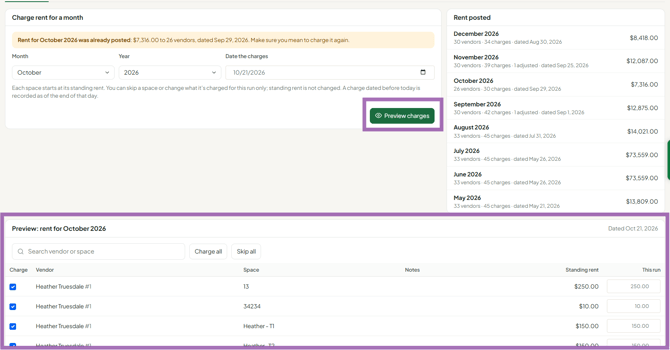
- Select the Month and Year.
- Set Date the charges. This is the date the rent posts on each vendor's account. Settlements only include rent dated on or before their cutoff.
- Click Preview charges. The preview lists each space and its rent. Answer any move-out questions it shows.
- Check every row. To change one space's rent for this run only (for example, a mid-month move-in), adjust its amount. To leave a space out, skip it. These changes apply to this run only and don't change the space's normal rent.
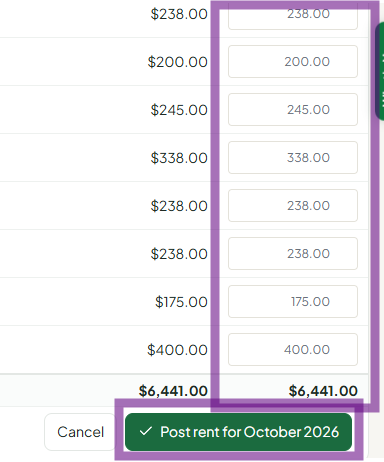
- Click Post rent for . Rent is added to each vendor's balance and appears on the Recent activity tab.
- If you use recurring fees (for example, a monthly camera or remote-access fee), open the Recurring fees tab and click Run on each fee when you post rent.
Timing rent with settlements
- Settlements include only rent dated on or before the settlement cutoff date. If you run settlements on the 31st, post rent before that, dated on or before the 31st.
- Because rent posts on its charge date and settlements use a cutoff date, one settlement can include two months of rent (for example, a vendor's unpaid prior month plus the current month). That's correct, not a double charge. Check the vendor's account activity to confirm.
Troubleshooting
- The page warns that rent is already posted for this month: check whether the month was already run early (for example, September rent posted on Aug 31). Run the next month instead. Don't post the same month twice; if you're not sure, contact support.
- An adjusted amount looks wrong after posting: check the vendor's balance on the Balances tab, and correct it on the Credits & fees tab with a credit or fee and a clear description.
- New vendor owes several months: their booth was probably assigned before their real start date. Post a credit for the extra months on the Credits & fees tab.
- Prepaid rent (several months): post a credit for the prepaid amount. Future rent runs draw it down automatically.
- Vendor charged twice for one space: look for a duplicate space stacked on the store map, or contact support.
- Settlement already ran without rent: settlements can't be deleted from your side. Contact support before checks are handed out. Support can back out the settlement so you can post rent and settle again.
- "Rent & fees" opens an access error: the page is for Administrators only. Ask your store owner to post rent.
