
On a computer, go to Inventory, click Export ▾ and choose CSV, Excel (.xlsx) or PDF. It exports the items you've ticked; if none are ticked, the items matching your filters; otherwise everything.
Who this is for: Vendor, Store staff
These steps use the New Experience. If your menu looks different, click Switch to New Vendor Experience (vendors) or Switch to New Experience (store staff) at the top of the page.
Steps
- Vendors: open Inventory. Staff: open Inventory > All items (type a vendor number in the Vendor box for one vendor).
- For everything: untick any items, click All Items and set the filters to All. For a subset: tick the items or filter the list.
- Click Export ▾ in the page header.
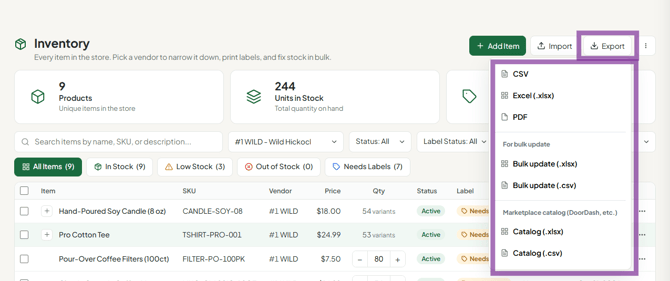
- Choose the format:
- CSV or Excel (.xlsx): in the same format as the import template. Good for backups or copying inventory to another store.
- PDF: a printable list.
Bulk update file
To edit many prices or quantities in a spreadsheet and upload them again, use the bulk update file, which includes Item ID and Variant ID. See "How do I update prices or quantities for many items at once?".
Good to know
- Barcode value: the code encoded on Syncrostore labels is internal and isn't exported. Use Item ID, SKU or UPC.
- Variant quantities: yes. CSV and Excel exports include each variant on its own row with VariantSKU, VariantPrice, VariantCost and VariantQuantity, the same columns the import uses.
- Exporting changes nothing. It doesn't remove items or reduce quantities. To move stock to another store, use Transfer in the bulk bar.
Troubleshooting
- The export is missing items: some items were ticked, or a filter or chip is on. Clear them and export again.
- I need Item IDs and Variant IDs: use the bulk update file.
- I want only sold-out items: click the Out of Stock chip, then export.
