
Go to Settings > Store settings, open the Customer Loyalty tab, click Edit, tick Enable the loyalty program, set how many points customers earn per dollar and what each point is worth, and click Save.
Who this is for: Store admins.
These steps use the New Experience. If your menu looks different, click Switch to New Experience at the top of the page.
Steps
- Go to Settings > Store settings and open the Customer Loyalty tab. In the Customer Loyalty section, click Edit.
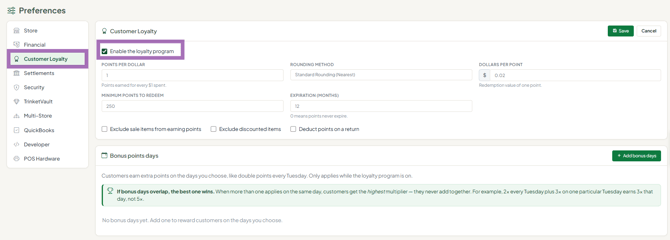
- Tick Enable the loyalty program.
- Set:
- Points Per Dollar - e.g. 1 means a $10 purchase earns 10 points.
- Rounding Method - Standard Rounding (Nearest), Always Round Up or Always Round Down.
- Dollars Per Point - e.g. $0.01 means 100 points = $1.00.
- Minimum Points To Redeem
- Expiration (months) - 0 means never.
- Exclude sale items from earning points / Exclude discounted items - no points on those items.
- Deduct points on a return
- Click Save (or Cancel to discard your changes).
To give extra points on certain days (for example double points every Tuesday), use the Bonus points days section on the same tab: click Add bonus days, choose how much and when, and click Save. These changes apply straight away, without the section Edit button.
Points earned per dollar and dollar value per point together decide what your program costs you - balance customer reward against margin.
Good to know
- Customers only earn points when they're attached to the sale.
- See a customer's points: go to Sales > Customers, click View on the customer and open the Loyalty points tab. Use Adjust points to add or redeem points by hand.
- The Customers page has a Has points chip and a Loyalty points out card.
- Points redeemed show as payment type Loyalty on the Sales Detailed report.
Troubleshooting
- Customers aren't earning points: confirm the program is enabled and saved, and the customer was attached before payment.
