
Go to People > Vendors, click View on the vendor, click Edit vendor (or open the Settings tab), change the fields you need and save - but use Change email to change their email.
Who this is for: Store admins and managers. Vendors: ask your store to make these changes; Syncrostore support makes account changes only at the store's request, not the vendor's.
These steps use the New Experience. If your menu looks different, click Switch to New Experience at the top of the page.
Steps
- Go to People > Vendors and find the vendor (search by name, vendor #, alias, email or phone).
- Click View on the right of their row to open the vendor's page.
- Click Edit vendor, or open the Settings tab.
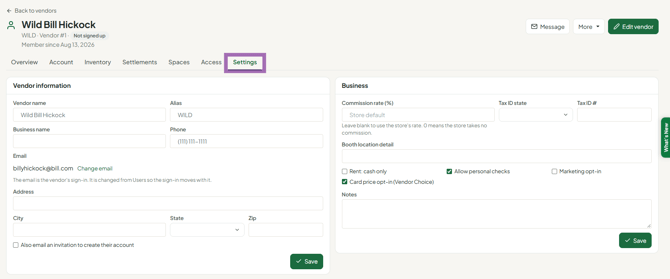
- Update what you need:
- Vendor information - Vendor name, Alias, Business name (shown on checks), Phone, and the mailing address (Address, City, State, Zip).
- Business - Commission rate %, Tax ID, Booth location detail, Rent: cash only, Allow personal checks, Marketing opt-in, Card price opt-in (Vendor Choice), Notes.
- Feature switches are on the Access tab.
- Save your changes.
Changing the email
The email is shown read-only. Click Change email next to it to open the Change Email / Access tool, which lets you change where statements go (contact email) or the email they sign in with (login email).
Things you can't change here
- Vendor # - contact support. Changing it breaks the link to existing items and labels.
- Merging two vendor numbers - use Merge vendor to a login in Change Email / Access to put both under one login, or contact support to combine duplicate records.
