
Open store settings from Settings > Overview (the Money tax & payments tile), enter your State, City and Local tax rates (they're added together), add your Federal and State Tax IDs, and click Save in the Taxes section of the Financial tab.
Who this is for: Store admins.
These steps use the New Experience. If your menu looks different, click Switch to New Experience at the top of the page.
Steps
- Go to Settings > Overview and click the Money tax & payments tile (under Your store). The classic Preferences page opens on the Financial tab. Scroll to the Taxes section and click its Edit button.
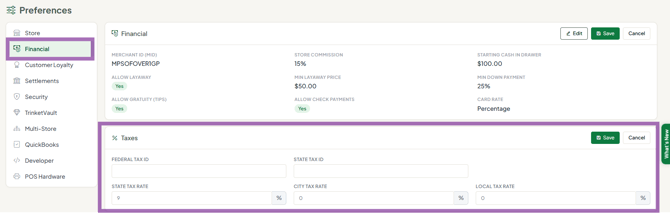
- Enter:
- State Tax Rate - state sales tax %.
- City Tax Rate - any city tax %.
- Local Tax Rate - any other local/county tax %.
- Federal Tax ID and State Tax ID - your store's tax ID numbers, for reporting.
- Click Save in the Taxes section.
The three rates are combined and applied to taxable items at the register. Check your rates with your local tax authority - Syncrostore doesn't give tax advice.
Good to know
- Only one current rate is stored. If you change your rate, the Taxes report compares older sales against the new rate, which can show a "difference" for past periods. Tax Collected is always the real figure.
- No rate set = blanks on the Taxes report. Tax Expected and Tax Difference stay blank until you enter a rate.
- No round-up option for sales tax.
- The Taxes report is under Reports, in the Tax group.
Making things tax-free
- One item, always: an admin goes to Inventory > All items, opens the item's row menu, chooses Edit item, and ticks Tax Exempt in the Resell section. You can also pick a Custom Tax Rate there. Vendors can't do this themselves.
- One whole sale (reseller, exempt organisation, tax holiday): attach a tax-exempt reseller customer to the transaction. Set the customer up on Sales > Customers with their details in the Reseller & ID section, and tick Reseller (buys for resale) in that section - that box is what removes tax at the register. Many stores create a placeholder "Tax Exempt" customer for this.
