
Open the vendor from People > Vendors, go to the Spaces tab and use Assign a vacant space; or double-click the booth on Store Management > Store map to open its space details. The rent amount you set is used each time you generate rent.
Who this is for: Store admins.
These steps use the New Experience. If your menu looks different, click Switch to New Experience at the top of the page.
From the vendor's page
- Go to People > Vendors and click View on the vendor's row.
- Open the Spaces tab.
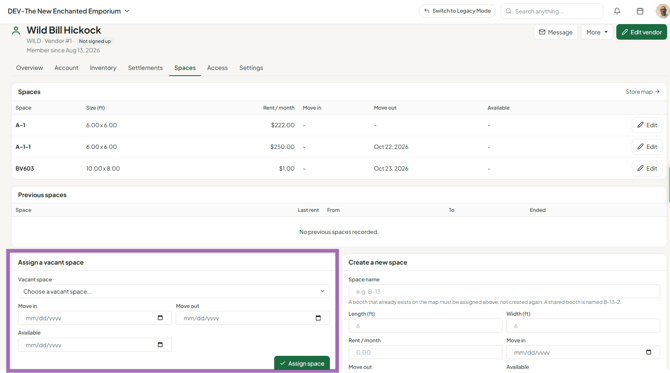
- Under Assign a vacant space, pick the space and enter the Move in, Move out and Available dates as needed, then click Assign space.
- To change rent or other details on a space they already have, click Edit on it. The classic space editor opens in a dialog (fields below).
- Only use Create a new space for a booth that doesn't exist yet (fill in Space name, Length, Width, Rent and dates, then Create space). An existing booth must be assigned, not created again.
From the store map
- Go to Store Management > Store map.
- Double-click the space (booth) shape.
- Fill in:
- Vendor ID - the vendor renting this space.
- Length and Width (feet) - square footage is calculated.
- Rent Amount - monthly rent. Cost per square foot is calculated.
- Date Available
- Move-In Date - set this to the vendor's real start date.
- Move-Out Date - when they leave or will leave.
- Notice Given - whether they've given notice.
- Notes
- Save.
Moving vendors in and out
- Move-in: assign the vendor only from their actual start. If a booth is assigned earlier, rent can be charged for months before they arrived - fix with a credit on Money > Rent & fees (Credits & fees tab).
- Move-out: the vendor's Spaces tab has Move out by hand.
Troubleshooting
- Can't use a booth number: names must be unique; it's already used by another space.
- Rent is $0 or missing for a vendor: make sure the vendor is assigned to a space with a rent amount.
