
Open store settings from Settings > Overview (the Money tax & payments tile), go to the Financial tab, click Edit, change the settings you need - such as Allow Check Payments, layaway and receipt message - and click Save.
Who this is for: Store admins.
These steps use the New Experience. If your menu looks different, click Switch to New Experience at the top of the page.
Steps
- Go to Settings > Overview and click the Money tax & payments tile. The classic Preferences page opens on the Financial tab.
- Click Edit.
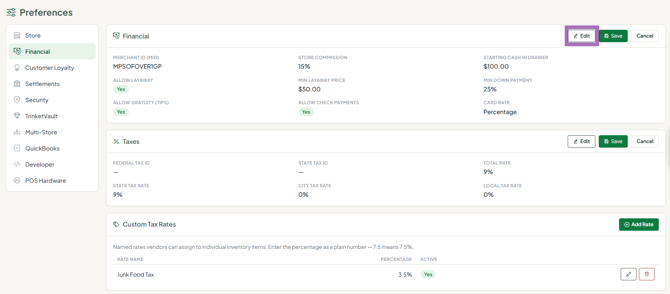
- Change what you need:
- Allow Check Payments - shows Check under Other Payment Methods at the register.
- Allow Layaway, Minimum Down Payment (%) and Minimum Layaway Price.
- Allow Gratuity (Tips) and Starting Cash In Drawer.
- Merchant ID (MID) - your card-processing merchant number. Card terminals themselves are set up on the POS Hardware tab (Payment Terminals), not here.
- Click Save. Changes apply from the next transaction.
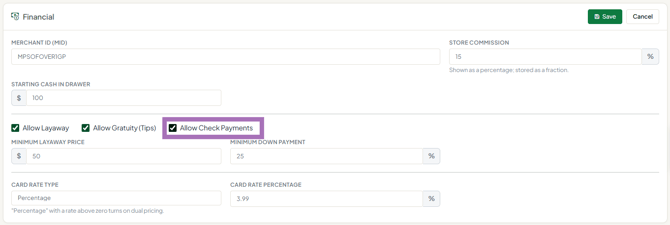
Other settings on this tab: Store Commission, Card Rate Type and Card Rate Percentage, and the Taxes and Custom Tax Rates sections (see related articles). The Receipt Message printed at the bottom of receipts and the customer-facing display are on the POS Hardware tab.
Troubleshooting
- No Check button at the register after moving to the new register: the switch turned check payments off. Tick Allow Check Payments here and save, then use Other Payment Methods > Check on Sales > Register.
- Layaway missing at the register: layaway also needs your store's plan to include it.
