
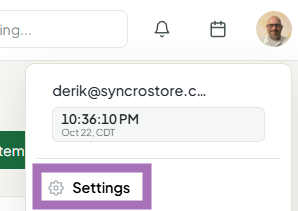
Click your avatar at the top right, choose Settings, open Notifications, pick what you want to hear about and how, and click Save notification settings.
Who this is for: Store admins and managers.
(Vendors have their own notification articles.)
These steps use the New Experience. If your menu looks different, click Switch to New Experience at the top of the page.
Steps
- Click your avatar (your initials or photo) at the top right and choose Settings. You can also click Settings at the bottom of the sidebar, or go to Settings > Overview and click the My notifications tile.
- In the list on the left, click Notifications.
- Under Tell me about, turn on the events you want: Sales, Large sales (the page shows "Large means $X or more"), Payouts, Low inventory and Store & system announcements. Staff also see Every sale in the store, Rent & fees and Upcoming vendor sales.
- Under How should we notify you?, choose your channels:
- Email - sent to the email address you sign in with.
- Push to my phone - alerts on the Syncrostore phone app.
- Browser notifications - click Enable (or Turn off). Not available on iPhone or iPad.
- In-app - always on. Alerts show in the bell at the top of the page.
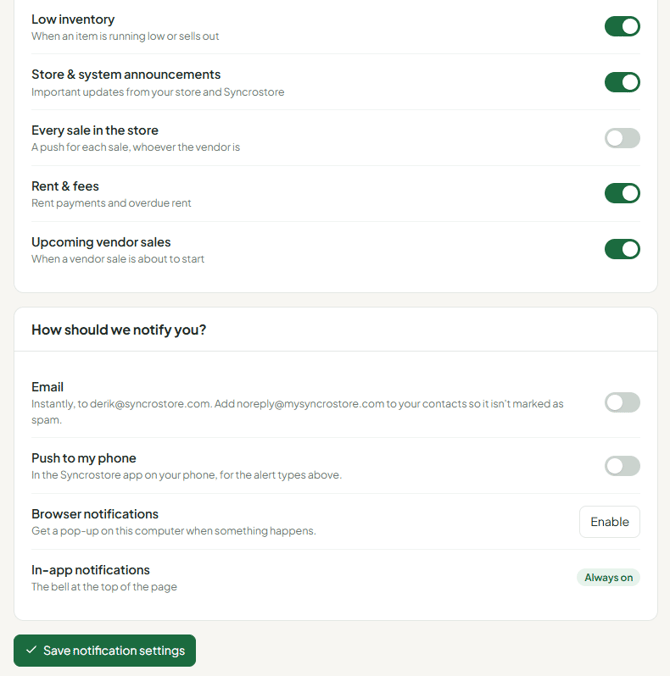
- Click Save notification settings.
Good to know
- Each person sets their own. Turning notifications on for your login doesn't turn them on for other admins or managers.
- Turning an event off stops it on every channel. For example, if Sales is off you get no email and no phone push for sales.
- Push to my phone is set separately at each store you work in.
- Upcoming vendor sales: when a vendor schedules a booth-wide sale, you're told 48 hours before it starts.
- Notifications go only to your login email. Adding a second email address isn't supported.
Troubleshooting
- Not getting emails: check spam/junk and make sure the event is turned on and saved.
- Browser notifications won't turn on: they aren't available on iPhone or iPad. Use Push to my phone with the Syncrostore app instead.
- Clicking the bell asks you to log in again: log in at your store's address (
<store>.mysyncrostore.com) and do a hard refresh (Ctrl+F5).
