
Open Settings (click your avatar at the top right, then Settings), go to Time Clock, and press Clock in at the start of your shift and Clock out at the end.
Who this is for: Cashier / store staff (and staff who are also vendors)
These steps use the New Experience. If your menu looks different, click Switch to New Experience (staff) or Switch to New Vendor Experience (vendors) at the top of the page.
Steps
- Click your avatar (your initials or photo) at the top right and choose Settings. You can also click Settings at the bottom of the sidebar.
- Choose Time Clock in the left list.
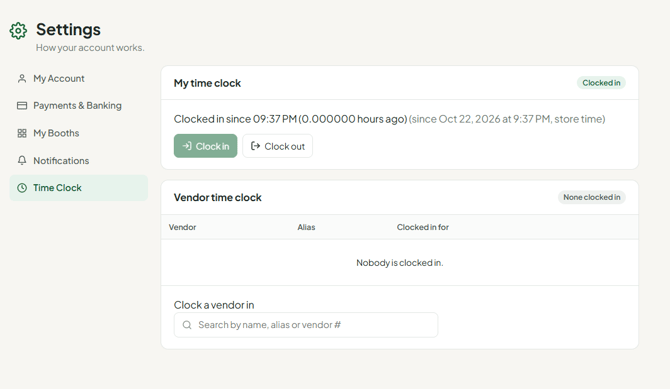
- Under My time clock, press Clock in.
- At the end of your shift, go back to Settings > Time Clock and press Clock out.
- Your hours appear on the Time Clock report for your admin (Reports > Time Clock).
Troubleshooting
- You forgot to clock out yesterday. The Time Clock section offers to fix it - use Close that shift. Otherwise ask your admin to correct the entry.
- You're both an employee and a vendor. Clock in under My time clock. If your hours don't show on the employee report, ask your admin to check the Vendor Time Clock report (Reports > Vendor Time Clock), in case you clocked in as a vendor.
- Vendors don't see Time Clock in Settings. It only appears for vendors if the store has turned on the vendor time clock.
- Times are an hour off. Your admin should check the store's time zone in Settings > Store settings. If no time zone is set, staff see a Set store time zone link under the store clock in the avatar menu.
- Duplicate or open entries. Ask your admin. Admins can adjust employee time entries (see "How to Adjust Employee Time Clock Entries"). They can also add a missing shift with Add Time Entry on the Time Clock or Vendor Time Clock report. Neither report can delete an entry, so duplicate entries still need support to remove.
- Nothing happens when you press Clock in. Hard-refresh the page (Ctrl+F5) and try again. If it still fails, ask your admin to contact support.
- The mobile app logs you out when you try to clock in. Use a browser at your store's address instead.
