
Go to Money > Rent & fees, open the Credits & fees tab, choose the type, pick the vendor (or all vendors), enter a description, amount and date, and click Post.
Who this is for: Store administrators.
These steps use the New Experience. If your menu looks different, click Switch to New Experience at the top of the page.
Steps
- Go to Money > Rent & fees.
- Open the Credits & fees tab.
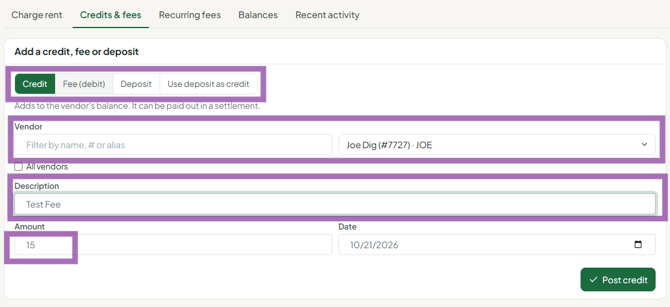
- Choose the type:
- Credit - increases the vendor's balance (the store owes them more).
- Fee (debit) - decreases the vendor's balance (they owe the store more).
- Deposit - records a deposit payment. Deposits are kept separate and don't affect settlement calculations.
- Use deposit as credit - applies a credit using the vendor's existing deposit (for example, toward their last month).
- Pick the vendor, or choose all vendors to post the same entry to everyone.
- Enter a Description explaining why, the Amount, and the Date. The description shows on the vendor's account activity.
- Click Post. The balance updates.
Common fixes
- Sale rung up under the wrong vendor: post a fee (debit) to the wrong vendor and a credit to the correct vendor for the same amount, with the transaction number in the description.
- Vendor paid rent outside Syncrostore (Zelle, cash to the owner): credit their account so the next rent run or settlement doesn't charge them again.
- Prepaid several months of rent: credit the prepaid total. Monthly rent runs draw it down.
- Duplicate or wrong rent charge: credit the vendor the amount of the extra charge.
Good to know
- Entries can't be edited or deleted. If you make a mistake, post the opposite entry (a fee to cancel a credit, and so on).
- Post all credits and fees before you run settlements, dated on or before the settlement cutoff, so they're included.
- To review what you've posted, open the Recent activity tab on the Rent & fees page, or open the vendor (People > Vendors > View) and go to Account > Account activity.
Troubleshooting
- The balance didn't change after a deposit: that's expected. Deposits are tracked separately. Use Credit or Fee (debit) to change the balance.
- "Rent & fees" opens an access error: the page is for Administrators only.
