
Item deals give a discount when a customer buys at least a minimum quantity of one item. Open the item with ⋯ > Edit item, go to the Deals section, choose a deal type, set the minimum quantity and discount, and click Save Item.
Who this is for: Vendor, Store staff
These steps use the New Experience. If your menu looks different, click Switch to New Vendor Experience (vendors) or Switch to New Experience (store staff) at the top of the page.
Add a deal
- Vendors: open Inventory. Staff: open Inventory > All items. Click ⋯ > Edit item on the item (click Edit Item if the form opens in view mode). You can also add a deal when creating an item with Add Item.
- Scroll to the Deals section.
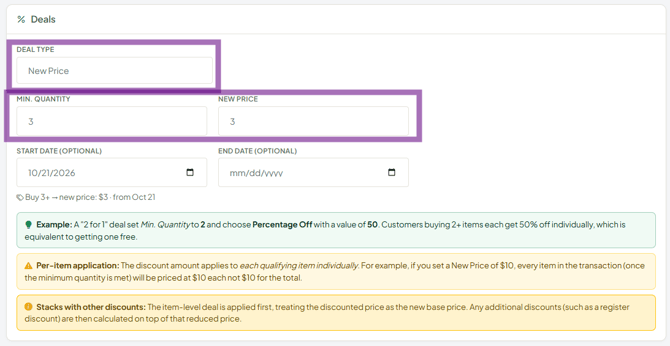
- Choose a Deal Type, enter the Min. Quantity and the Discount Amount.
- Optional: set a Start Date and End Date. Leave them blank for a deal with no dates.
- Click Save Item.
Deal types (the discount applies to each qualifying item)
| Deal type | What it does | Example |
|---|---|---|
| New Price | Each item is charged the new price once the minimum is reached | "3 for $25": min qty 3, new price $8.33 |
| Flat Amount Off | Takes a fixed amount off each item | "3 for $6" on a $3 item: min qty 3, $1.00 off |
| Percentage Off | Takes a percent off each item | "Buy 2, get 1 free" (approx.): min qty 2, 50% off, which makes 2 for the price of 1 |
See your deals
Item deals are listed on Promotions under Item deals (staff: Inventory > Promotions & deals, Item deals tab). You can delete a deal there.
Good to know
- Deals stack with sales: the item deal is applied first, then any sale is calculated on the reduced price.
- A deal covers all variants of the item, so mixing sizes or colours of one item counts toward the minimum.
- Deals can't combine different items. For a mix-and-match deal (e.g. any 3 bookmarks), make the designs variants of one parent item and put the deal on that item.
- For a sale on your whole booth or a category, use Promotions > Start a sale (see "How do I run a sale on my booth? (vendors)").
Troubleshooting
- The deal isn't applying: check the cart has at least the minimum quantity of that same item, and that today is between the Start and End dates.
