
Log in at your own store's web address, which looks like https://yourstore.mysyncrostore.com, not at a generic Syncrostore page, Google result or the help site.
Who this is for
- Vendors, cashiers and store staff. Each store has its own Syncrostore site and its own logins.
Steps
- Get your store's address from your store, or from your invitation email. It is in the form
https://yourstore.mysyncrostore.com. - Type it directly into your browser's address bar (not the Google search box). Make sure it begins with https://.
- On the sign-in page (
https://yourstore.mysyncrostore.com/Account/UserLogin), enter your email and password and click Login.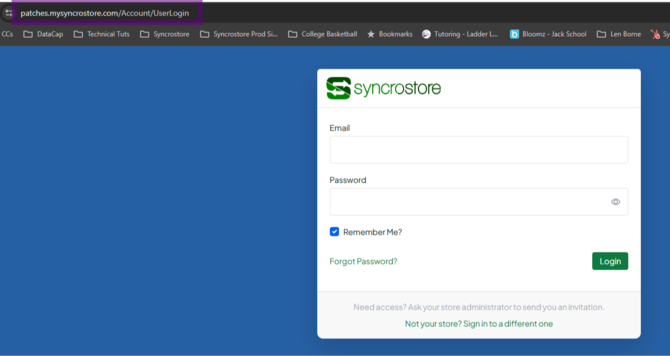
- Bookmark the page so you always come back to the right place. - Chrome (computer): three-dot menu > Save and share > Create shortcut. - iPhone/iPad (Safari): tap Share > Add to Home Screen.
Troubleshooting
- "Your store has its own sign-in page, please re-enter your password": You were redirected to your store's page. Enter your password again there.
- "Account not found," or reset says you don't exist but sign-up says you already do: You're probably on the wrong site or a different store's site. Go to your store's address and try again.
- Login works on your phone but not your laptop: Check that your laptop is using the same store address and the same email.
- Forgot your password: Use Forgot password on your store's sign-in page (
/Account/ForgotPassword). If the reset link in the email isn't clickable, copy and paste it into your browser. - You're on the help site (support.syncrostore.com): That site only has articles. You can't log in or add inventory there.
- "An error has occurred" when clicking your invitation link: You've probably already registered. Don't reuse the registration link; go to your store's sign-in page.
- Your invitation expired or never arrived: Ask your store to resend it. See Troubleshooting: Vendor Account Setup Email Not Received.
- The page won't load at all: See Why can't I reach my store's Syncrostore site?
Related articles
- How do I log in for the first time? (vendors)
- Why does my inventory go to the wrong store? (multi-store vendors)
- How do I reset my password?
